
Why Stack Multiple Import Rules?
Not all search terms come from the same campaigns or generate the same results. Some may come from Auto Campaigns, others from Sponsored Products Research Campaigns, while some may be discovered through Sponsored Brands Video Ads.
Using a single Import Rule may not provide enough flexibility when you want to collect search terms from different sources or apply different performance criteria to each source.
By assigning multiple Import Rules to the same destination ad, you can combine different keyword-harvesting strategies without creating separate destination ads for each source.
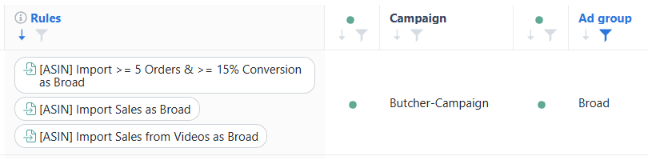
Each Import Rule can have its own:
- Search Term Source: Determines where Scale Insights collects search term performance data.
- Performance Criteria: Defines which search terms qualify for importing.
- Match Type and Initial Bid: Determines how qualifying keywords are created and their starting bids.
- Destination Ad: Specifies where the qualifying keywords or product targets will be added.
This allows you to build a more flexible harvesting strategy based on your campaign structure and advertising goals.
[drawer]The Strategy: Three Ways to Stack Import Rules
Here are three practical scenarios where using multiple Import Rules can help expand your keyword-harvesting strategy.
1. Harvesting from Multiple Campaign Types
You may have several campaigns generating valuable search terms, but you don't necessarily want to use the same source for every Import Rule.
For example, you may want to collect search terms from both Sponsored Products and Sponsored Brands Video Ads and consolidate qualifying keywords into one destination ad.
Strategy: Create separate Import Rules for each campaign type, using the appropriate Search Term Source and performance criteria.
Example configuration:
- Import Rule 1 – Sponsored Products: Collects search terms from associated Sponsored Products ads that meet your desired performance criteria.
- Import Rule 2 – Sponsored Brands: Collects qualifying search terms from Sponsored Brands campaigns, such as Video Ads.
Assign both Import Rules to the same compatible destination ad.
This allows you to discover keyword opportunities from different advertising formats without manually reviewing each campaign's search term performance.
2. Combining Auto Campaign and Manual Campaign Search Terms
Auto Campaigns are useful for discovering search terms that Amazon identifies as relevant to your products. Meanwhile, Manual Campaigns can provide additional search term opportunities from your existing keyword targeting.
You can use multiple Import Rules to harvest from both sources and consolidate qualifying search terms into one destination Manual Campaign ad group.
Strategy: Use separate Import Rules to collect search terms from Auto Campaigns and existing Manual Campaigns.
Example configuration:
- Import Rule 1 – Auto Campaign: Identifies search terms from Auto Campaigns that generate orders and meet your desired ACOS.
- Import Rule 2 – Sponsored Products: Collects additional search terms from associated Sponsored Products ads using a different set of performance criteria.
Assign both rules to the same destination ad group in your Manual Campaign.
This approach helps you expand your keyword targeting using both automatically discovered search terms and opportunities from existing Sponsored Products campaigns.
3. Applying Different Performance Criteria to Different Sources
Not all search term sources need to follow the same harvesting conditions.
For example, search terms discovered through Auto Campaigns may need more orders before they qualify for importing, while search terms from established Research Campaigns may already have sufficient performance data.
Applying the same conditions to both sources may not align with your harvesting strategy.
Strategy: Create separate Import Rules with different performance criteria based on the source and the quality of its search term data.
Example configuration:
- Import Rule 1 – Auto Campaign: Requires at least 3 orders and an ACOS below 30% before importing a search term.
- Import Rule 2 – Research Campaign: Requires at least 2 orders and an ACOS below 25%.
Both rules can be assigned to the same destination ad.
This gives you more control over the quality of search terms being imported from each source.
Note: The criteria above are illustrative examples. Adjust them based on your advertising goals and actual campaign performance.
[drawer]How Multiple Import Rules Work Together
Instead of relying on a single Import Rule to collect search terms from every source, you can assign multiple rules to the same destination ad.
Each rule evaluates its own Search Term Source and performance criteria to identify qualifying search terms.
For example, you might configure:
| Import Rule | Search Term Source | Performance Criteria | Destination |
|---|---|---|---|
| Rule A | Auto Campaign | At least 3 orders, ACOS below 30% | Performance Ad Group |
| Rule B | Sponsored Products | At least 2 orders, ACOS below 25% | Performance Ad Group |
| Rule C | Sponsored Brands | At least 3 orders, ACOS below 35% | Performance Ad Group |
All three rules contribute qualifying keywords to the same destination ad group.
This allows you to consolidate search term harvesting from multiple sources while maintaining separate conditions for each Import Rule.
Important considerations:
- Make sure each Import Rule uses the intended Search Term Source and performance criteria.
- Verify that the destination ad supports the keywords or product targets being imported.
- Review the rules for overlapping search terms to understand how duplicate or already-existing targets are handled.
- Use appropriate match types and initial bids for your keyword-harvesting strategy.
[drawer]How to Apply This Strategy
Follow these steps to create and assign multiple Import Rules to the same destination ad.
Step 1: Identify Your Search Term Sources
Determine which campaigns or ad groups you want to collect search terms from.
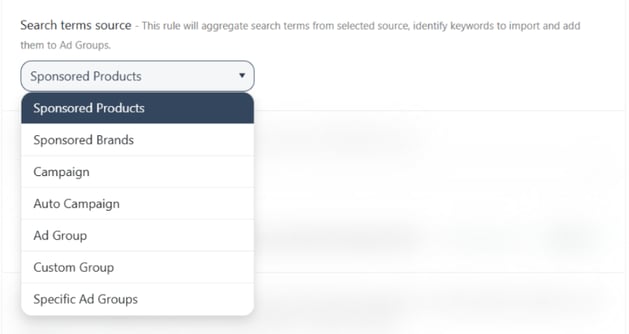
For example, you may want to harvest from Auto Campaigns, Sponsored Products Research Campaigns, and Sponsored Brands Video Ads.
If you need help choosing the appropriate source, see Understanding Search Term Sources in Import Rules.
Step 2: Define Your Performance Criteria
Decide which search terms should qualify for importing from each source.
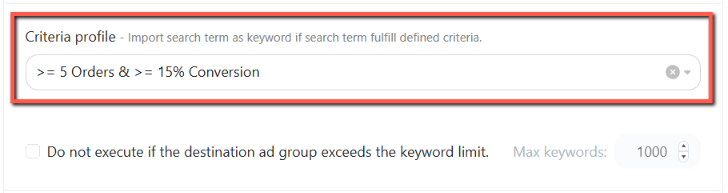
Consider the number of orders, ACOS, clicks, spend, or other available performance conditions based on your harvesting goals.
You can use different criteria for each source depending on its performance and the level of confidence you have in its search term data.
Step 3: Create Your Import Rules
Create a separate Import Rule for each harvesting strategy.
For each rule:
- Select the appropriate Search Term Source.
- Configure its performance criteria.
- Set the desired match type and initial bid.
- Select the intended destination ad.
Repeat the process for each additional Import Rule.
Step 4: Assign the Rules to the Same Destination Ad
Assign all the Import Rules to the destination ad where you want qualifying keywords or product targets to be created.
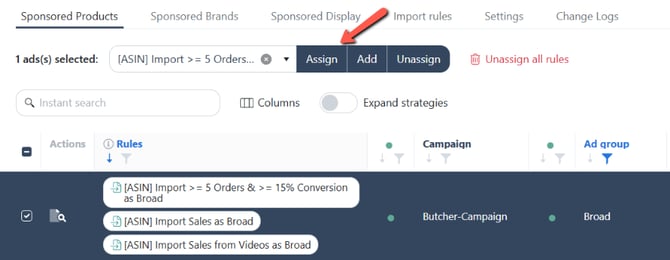
Make sure the rules are configured for compatible destination ad types.
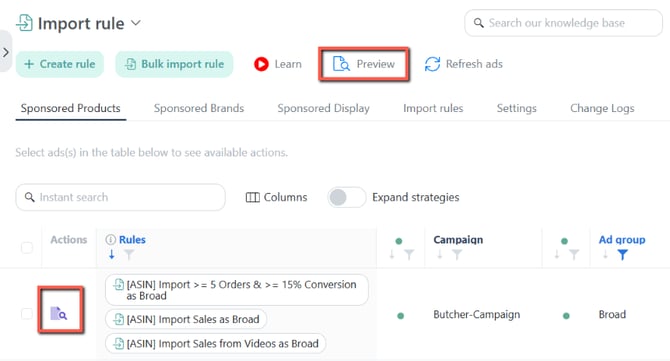
Step 5: Preview Your Rules
Save and assign each Import Rule before accessing its Preview feature.
Review the qualifying search terms for each rule to make sure they align with your intended harvesting strategy.
Step 6: Monitor and Refine Your Strategy
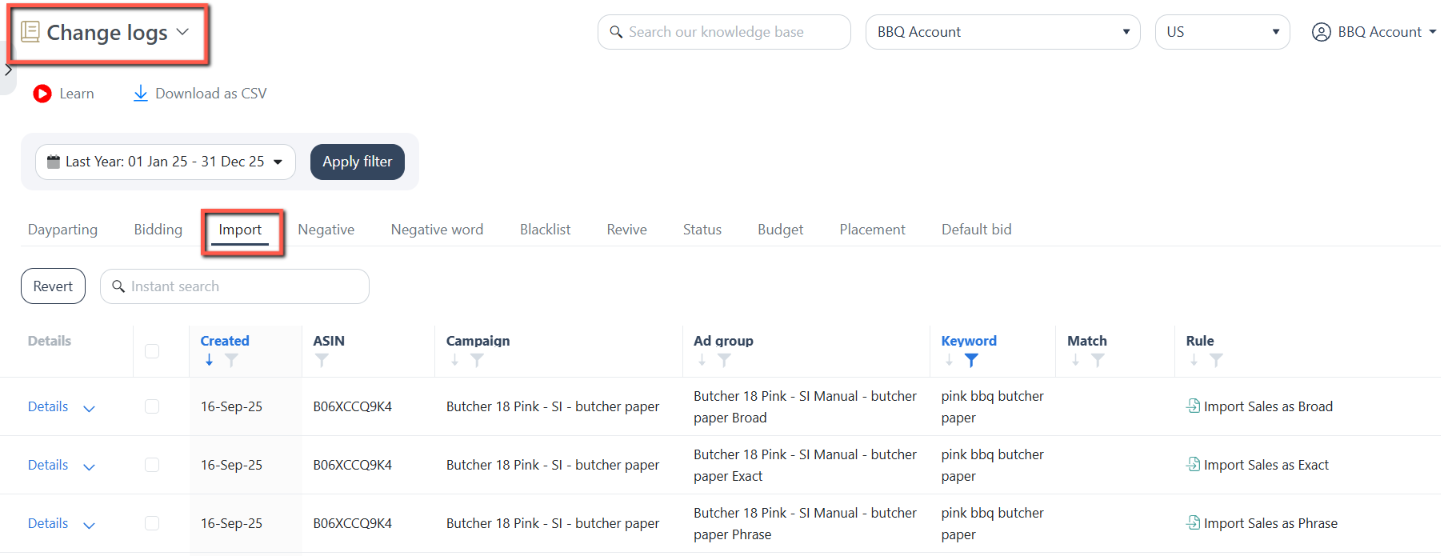
Monitor the keywords and product targets added to your destination ad and track the Import Rule's actions through the Change Log to see which changes have been applied.
Review their subsequent performance and adjust the criteria, match types, or initial bids of individual Import Rules as needed.
As your campaigns generate more search term data, continue refining your harvesting strategy to focus on the sources and conditions that deliver the best results.
Related Articles
- What is the Import Rule? – Learn how Import Rules automate keyword and product-target harvesting and how to configure them.
- Understanding Search Term Sources in Import Rules – Learn how each Search Term Source works and when to use it.
- Stackable and Mutually Exclusive Rules – Understand how stackable and mutually exclusive automation rules interact.