
The Import Rule automates keyword and product-target harvesting by analyzing search term performance and adding qualifying search terms to your selected destination ad.
Instead of manually reviewing search term reports and creating new targets, you can configure an Import Rule to identify search terms that meet your performance criteria and automatically add them to an existing ad group.
Navigation: Automation → Import Rule
For example, you may have a Research Campaign generating orders from search terms that are not yet targeted in your Performance Campaign. You can use an Import Rule to identify search terms that meet your desired performance criteria and automatically add them as new keywords to your Performance Campaign.
This helps you discover additional targeting opportunities, expand your campaigns, and reduce manual keyword management.

[drawer]How Does the Import Rule Work?
When identifying search terms to import as new keywords, the Import Rule evaluates four key aspects:
- Search Term Source: Which campaigns or ad groups should be analyzed?
- Performance Criteria: Which search terms qualify for importing based on your configured conditions?
- Match Type and Initial Bid: What match type and starting bid should be applied to the new keywords?
- Destination Ad: Which ad group should receive the newly created keywords?
These settings determine how Scale Insights identifies, evaluates, and imports qualifying search terms into your campaigns.

The process follows five steps:
Step 1: Identify the Search Term Source
The algorithm determines which campaigns or ad groups to analyze based on your selected Search Term Source.

Scale Insights provides several source options, allowing you to control where search term performance data is collected.
Learn more: Understanding Search Term Sources in Import Rules.
Step 2: Aggregate Historical Performance Data
Scale Insights collects search term performance data from the selected source based on your configured analysis period.
By default, the algorithm analyzes the past 60 days of data, excluding the most recent 2 days to account for reporting delays.
You can customize the analysis period to use up to 180 days of historical data and adjust the number of days to skip.
Learn more: How Do Algorithms Analyze Data?
Step 3: Evaluate Performance Criteria
The algorithm filters the aggregated search terms based on the conditions configured in your Import Rule.
Only search terms that meet your specified criteria qualify for importing.

For example, you can configure criteria to identify search terms with:
- At least 3 orders.
- An ACOS below 30%.
This allows you to focus on search terms that generate sales while maintaining your desired advertising efficiency.
Step 4: Determine Match Types and Initial Bids
For qualifying search terms, the algorithm determines the keywords to create based on your selected match type and calculates their initial bids using a percentage of their average search term CPC.

This allows you to control how imported keywords are targeted and establish their starting bids.
Step 5: Add New Keywords or Product Targets
Finally, the algorithm adds qualifying keywords or product targets to the destination ad assigned to the Import Rule.

This automates the process of transferring successful search terms into your chosen campaigns.
[drawer]How to Configure an Import Rule
Follow these steps to create an Import Rule and automate your keyword or product-target harvesting.
Step 1: Navigate to Import Rule
Go to Automation → Import Rule in your Scale Insights account.
Create a new Import Rule or select an existing one to configure.
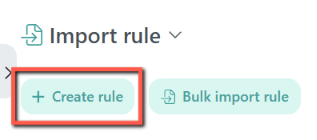
Step 2: Select Your Search Term Source
Choose where Scale Insights should collect and analyze search term performance.
The available options include Sponsored Products, Sponsored Brands, Auto Campaign, Campaign, Ad Group, Custom Group, and Specific Ad Groups.
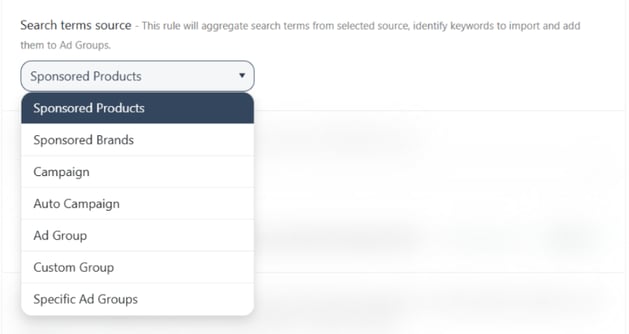
Each option offers a different level of control over which campaigns or ad groups contribute search term data.
Learn more: Understanding Search Term Sources in Import Rules.
Step 3: Configure Your Performance Criteria
Set the conditions that search terms must meet before they qualify for importing.
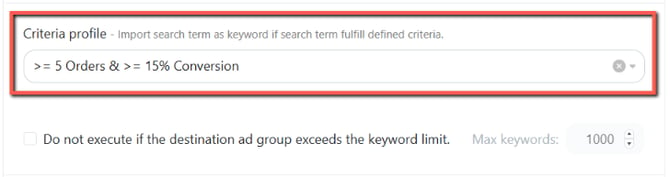
For example, you may want to import search terms that have generated at least 3 orders with an ACOS below 30%.
Choose criteria that align with your advertising goals and ensure that search terms have sufficient performance data.
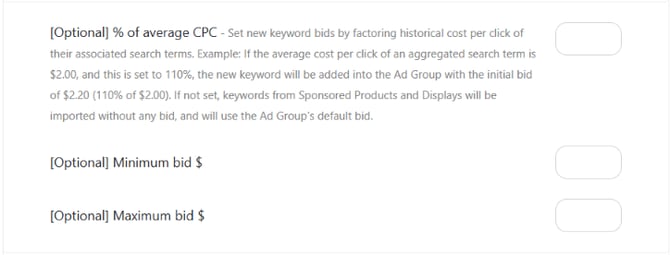
Step 4: Set the Match Type and Initial Bid
Choose the match type for the new keywords and configure the initial bid calculation based on a percentage of the average search term CPC.
This determines how the imported keywords will be targeted and their starting bids.
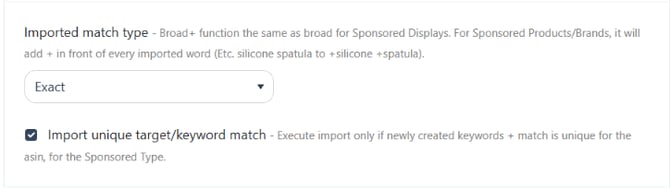
If this optional setting is left unconfigured, imported keywords from Sponsored Products and Sponsored Display will use the ad group's default bid.
Step 5: Save and Assign the Import Rule
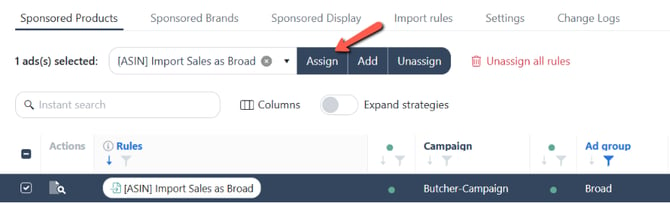
Select the destination ad group where you want Scale Insights to add qualifying keywords or product targets. Make sure it aligns with your intended targeting strategy.
Once configured, save the Import Rule and assign it to the selected destination ad group to activate the rule for evaluation.
Step 6: Preview Your Import Rule
After saving and assigning the Import Rule, you can access the Preview feature to review the search terms that qualify based on your configuration.
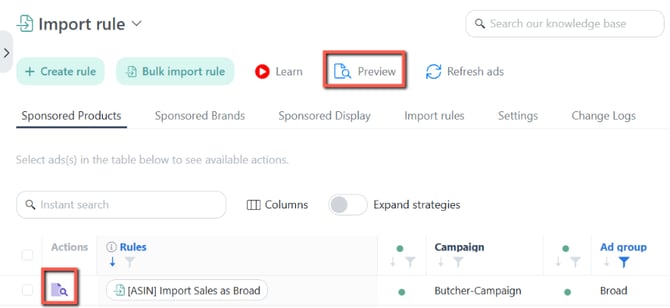
Use the preview to review the potential keywords or product targets before proceeding with your automation setup.
[drawer]Understanding Search Term Sources
The Search Term Source determines which campaigns or ad groups Scale Insights analyzes when identifying search terms to import.
Choosing the right source is important because it determines where the algorithm collects search term performance data.
Scale Insights supports different source options, including selecting associated campaigns, individual ad groups, or specific groups of ad groups.
Each option offers different levels of flexibility depending on your campaign structure and keyword-harvesting strategy.
For a detailed explanation of each option, including practical examples and selection instructions, see:
Understanding Search Term Sources in Import Rules
[drawer]Using Multiple Import Rules
You can assign multiple Import Rules with different configurations to the same destination ad.
This allows you to collect search terms from different sources or apply different performance criteria without needing to create separate destination ads.
Example: Combining Search Term Sources
Suppose you want to harvest high-performing search terms from both Sponsored Products and Sponsored Brands Video Ads and consolidate them into one destination ad.

You can create two Import Rules:
- Import Rule 1 – Sponsored Products: Analyzes Sponsored Products search terms and imports those that meet your specified performance criteria.
- Import Rule 2 – Sponsored Brands: Analyzes Sponsored Brands search terms using a different set of performance criteria.
Assign both rules to the same compatible destination ad.
This allows you to expand your keyword targeting using multiple search term sources while maintaining separate conditions for each source.
Learn more: Use Cases for Stackable Import Rules
[drawer]Important Considerations
Here are some recommendations to help you get more value from your Import Rules:
- Choose the right Search Term Source: Select a source that aligns with your campaign structure and the search terms you want to harvest.
- Set meaningful performance criteria: Focus on search terms that meet your advertising goals instead of importing every search term with activity.
- Consider your analysis period: Use an appropriate historical data range to capture meaningful performance trends while accounting for recent reporting delays.
- Choose the appropriate destination ad: The destination ad refers to the ad group where the Import Rule is assigned and qualifying keywords or product targets will be added. Make sure it aligns with your intended targeting strategy.
- Review your configuration: Use the Preview feature after saving and assigning the Import Rule to review qualifying search terms.
- Use multiple Import Rules strategically: Combine different sources and criteria when you want to consolidate search term harvesting into a single destination ad.
By configuring your Import Rules properly, you can automate keyword and product-target discovery, reduce manual campaign management, and expand your advertising reach using actual search term performance.
Related Articles
- How Do Algorithms Analyze Data? – Understand how Scale Insights collects and evaluates historical performance data.
- How to Import from Auto Campaigns – Learn how to use Auto Campaigns as a search term source.