
When configuring an Import Rule, one of the most important decisions is selecting the Search Term Source.
The Search Term Source determines which campaigns or ad groups Scale Insights analyzes when identifying search terms that meet your configured performance criteria.
Depending on your campaign structure and harvesting strategy, you can collect search terms from Sponsored Products, Sponsored Brands, Auto Campaigns, specific campaigns, or selected ad groups.
Scale Insights supports seven Search Term Sources:
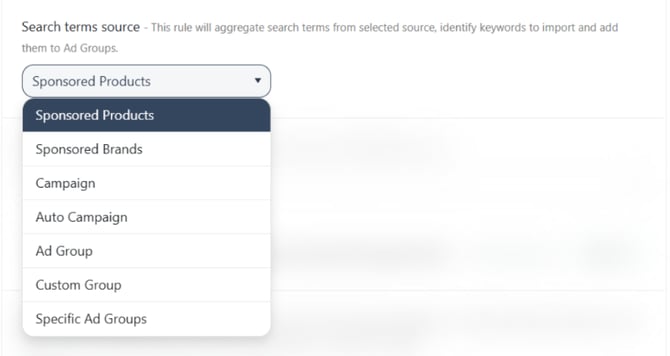
Each option offers a different level of control over where search terms are collected. Let's explore how they work and when to use them.
[drawer]1. Sponsored Products
Selecting Sponsored Products allows Scale Insights to analyze other Sponsored Products ads associated with the same ASIN as the destination ad.
This is useful when you want to collect performing search terms across multiple campaigns promoting the same product without limiting the analysis to a specific campaign or ad group.
Example: Harvesting search terms across multiple campaigns
Suppose you promote the same ASIN through three Research Campaigns, each targeting different keywords and audiences.
You want to identify search terms that generate orders across these campaigns and import qualifying keywords into your Performance Campaign.
By selecting Sponsored Products as your Search Term Source, Scale Insights can analyze the associated ads and identify search terms that meet your Import Rule criteria.
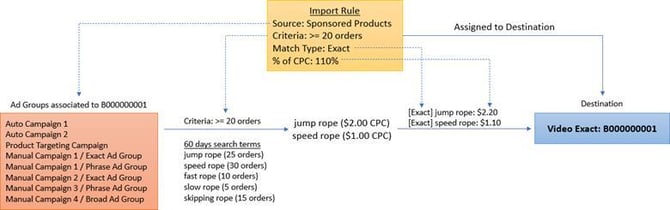
Exporting keywords from Sponsored Products to Sponsored Brand Video Ad
If you assign the Import Rule to a Video Ad, the algorithm will create the new keywords in the assigned Video Ad.
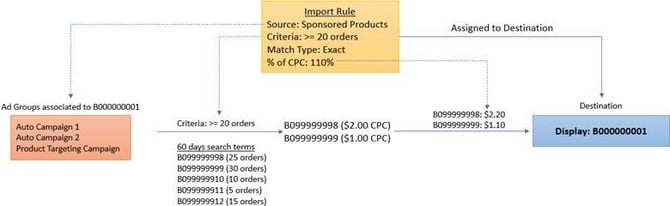
Exporting keywords from Sponsored Products to Sponsored Display
If you assign the Import Rule to a Display Ad, the algorithm will find product targets from Sponsored Products and create them in the assigned Display Ad.
When to use it:
- When you want to discover keyword opportunities across associated Sponsored Products campaigns.
- When multiple campaigns advertise the same ASIN.
- When you want to consolidate search term harvesting without manually selecting individual campaigns or ad groups.
[drawer]2. Sponsored Brands
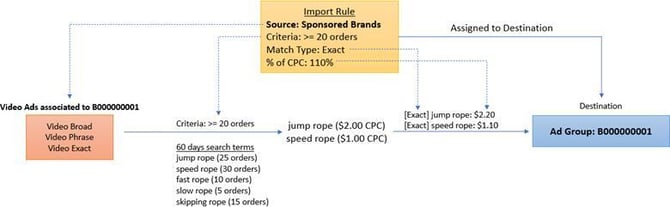
Selecting Sponsored Brands allows you to use search term performance from Sponsored Brands campaigns as the source for your Import Rule.
This is useful when you want to identify performing search terms from Sponsored Brands campaigns and import qualifying keywords into a destination ad.
Example: Harvesting search terms from Video Ads
Suppose you have multiple Sponsored Brands Video Ads generating search terms that meet your desired performance criteria.
You want to use these search terms to expand keyword targeting in another Video Ad or a Sponsored Products campaign.
By selecting Sponsored Brands as the Search Term Source, the Import Rule can evaluate the available Sponsored Brands search term data and import qualifying keywords into the assigned destination ad.
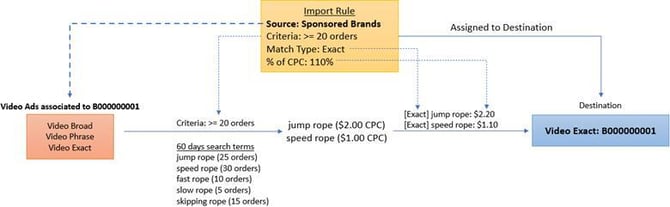
Exporting keywords from Sponsored Brand Video Ads to Video Ads
If you assign the Import Rule to a Sponsored Brand ad, the algorithm will export search terms from SB Video Ads to the destination ad.
Exporting keywords from Sponsored Brand Video Ads to Sponsored Products
If you assign the Import Rule to a Sponsored Product ad, the algorithm will export search terms from SB Video Ads to the destination ad.
When to use it:
- When you want to harvest performing search terms from Sponsored Brands campaigns.
- When you want to transfer qualifying search terms between Video Ads.
- When you want to use Video Ad search term performance to expand Sponsored Products keyword targeting.
[drawer]3. Campaign
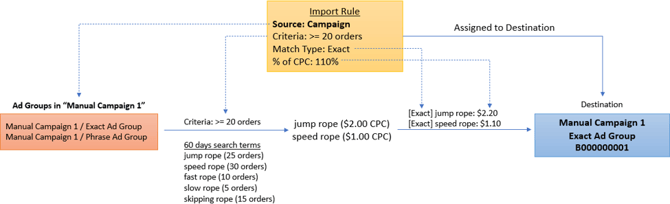
Selecting Campaign limits search term analysis to the campaign containing the destination ad.
This allows you to harvest search terms from different ad groups within the same campaign while excluding search term data from other campaigns.
Example: Harvesting keywords within a Research Campaign
Suppose you have a Research Campaign containing several ad groups targeting different keyword variations.
You want to discover additional search terms generated within this campaign and use them to expand your keyword targeting.
By selecting Campaign, the Import Rule analyzes the search terms associated with the destination ad's campaign.
When to use it:
- When you want to harvest search terms from multiple ad groups within the same campaign.
- When you want to keep keyword discovery within a specific campaign.
- When you want to avoid collecting search terms from other campaigns.
[drawer]4. Ad Group
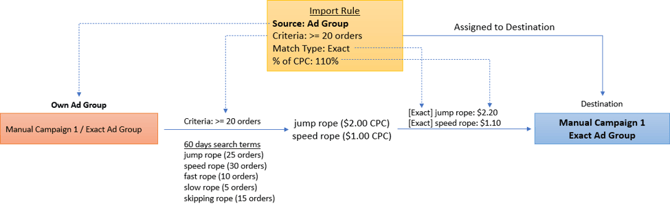
Selecting Ad Group limits search term analysis to the ad group containing the destination ad.
Unlike Campaign, which considers the campaign's associated ad groups, this option focuses on search term performance within a specific ad group.
Example: Discovering additional keyword variations
Suppose you have an ad group targeting the seed keywords "wireless mouse" and "bluetooth mouse."
You want to identify additional search terms generated from these keywords and expand your targeting with relevant long-tail variations.
By selecting Ad Group, the Import Rule analyzes search term performance within that specific ad group.
When to use it:
- When you want to harvest search terms from a specific ad group.
- When you want to maintain a focused keyword theme.
- When you want to discover additional keyword variations without including search terms from other ad groups.
[drawer]5. Custom Group
Selecting Custom Group allows Scale Insights to analyze search terms from selected ad groups that share the same custom group name.
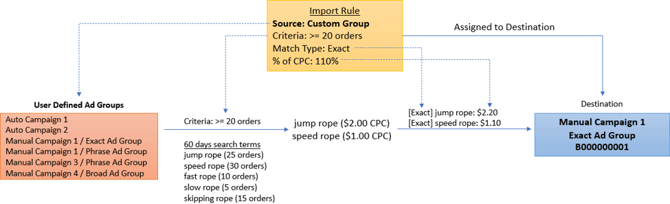
This gives you more flexibility in organizing your search term sources across campaigns.
To use this option, assign the same custom group name to the source ad groups and the destination ad group.
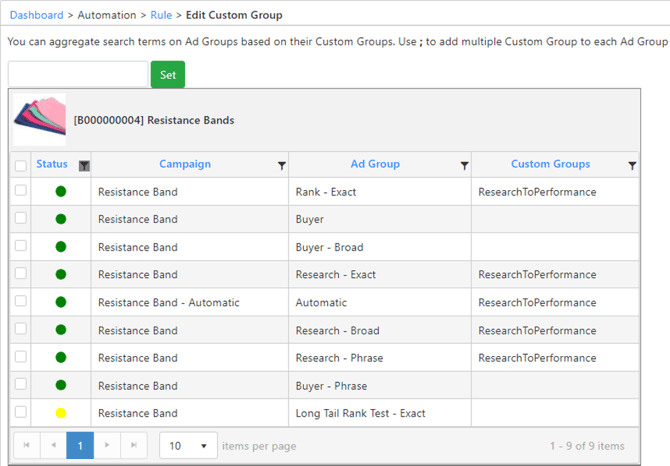
Example: Harvesting keywords from multiple Research Campaigns
Suppose you have three Research Campaigns and one Performance Campaign.
You want to collect search terms from selected ad groups across the three Research Campaigns and import qualifying keywords into a specific ad group in your Performance Campaign.
You can accomplish this using Custom Group:
- Open the source ad groups in your Research Campaigns.
- Assign the same custom group name to each source ad group.
- Open the destination ad group in your Performance Campaign.
- Assign that same custom group name to the destination ad group.
- Select Custom Group as the Search Term Source in your Import Rule.
Scale Insights will then analyze search terms from ad groups sharing that custom group name.
When to use it:
- When you want to harvest search terms from selected ad groups across campaigns.
- When your source and destination ads belong to different campaigns.
- When you want to organize source ad groups using reusable custom group names.
Important: Make sure the source and destination ad groups use the same custom group name so they are included in the intended group.
[drawer]6. Auto Campaign
Selecting Auto Campaign allows you to import search terms generated by your Amazon Sponsored Products Auto Campaigns.
Scale Insights groups Auto Campaigns by their associated ASIN to consolidate and aggregate search term performance data.
This is useful when you want to discover converting search terms from Auto Campaigns and transfer them into Manual Campaigns for more targeted keyword management.
Example: Harvesting keywords from Auto Campaigns
Suppose you have an Auto Campaign discovering relevant search terms for a product.
Some of these search terms generate consistent orders and meet your desired ACOS, making them good candidates for manual keyword targeting.
You can create an Import Rule, select Auto Campaign as the Search Term Source, configure your performance criteria, and assign a destination Manual Campaign ad group.
Scale Insights will evaluate the aggregated search term data from the associated Auto Campaigns and import qualifying search terms into your destination ad.
When to use it:
- When you want to discover converting search terms from Auto Campaigns.
- When you want to transfer successful search terms from Auto Campaigns into Manual Campaigns.
- When you want to expand manual keyword targeting using Auto Campaign search term data.
Learn more: How to Import from Auto Campaigns.
[drawer]7. Specific Ad Groups
The Specific Ad Groups option allows you to manually select the exact ad groups you want Scale Insights to use as search term sources.
Unlike Custom Group, you don't need to assign matching custom group names to your source and destination ad groups. You can directly select the ad groups you want to include in the Import Rule.
You can select up to 60 ad groups in total:
- Up to 30 Sponsored Products ad groups.
- Up to 30 Sponsored Brands ad groups.
The selected ad groups do not need to be linked to the destination ASIN.
Example: Harvesting keywords from selected ad groups
Suppose you manage several Research Campaigns promoting different products, but you only want to harvest search terms from five specific ad groups and import qualifying keywords into one destination ad group.
Instead of assigning custom group names, you can select those five ad groups directly using Specific Ad Groups.
This allows you to combine search term sources from different campaigns and ASINs without creating or maintaining custom groups.
Learn how to select specific ad groups as search term source: How to Use Specific Ad Groups as a Rule's Search Terms Source.
[drawer]Comparing Search Term Sources
Use this table to understand the differences between the seven options.
| Search Term Source | Scope of Analysis | Best Used For |
|---|---|---|
| Sponsored Products | Associated Sponsored Products ads for the same ASIN as the destination ad | Harvesting across campaigns promoting the same product |
| Sponsored Brands | Sponsored Brands search term data | Harvesting search terms from Video Ads |
| Auto Campaign | Auto Campaigns grouped by their associated ASIN | Harvesting search terms from Auto Campaigns |
| Campaign | Ad groups within the destination ad's campaign | Harvesting within a specific campaign |
| Ad Group | The destination ad's ad group | Focused keyword discovery within one ad group |
| Custom Group | Ad groups sharing the same custom group name | Harvesting from selected ad groups using custom groups |
| Specific Ad Groups | Individually selected ad groups, up to 30 SP and 30 SB | Directly selecting source ad groups across campaigns and ASINs |
Which Search Term Source Should You Choose?
The best Search Term Source depends on how you organize your campaigns and where you want to discover new keyword opportunities.
Here are some practical recommendations:
- Choose Sponsored Products if you want to collect search terms across associated Sponsored Products campaigns promoting the same ASIN.
- Choose Sponsored Brands if you want to harvest performing search terms from Sponsored Brands campaigns and use them in other Video Ads or Sponsored Products campaigns.
- Choose Auto Campaign if you want to harvest converting search terms from Auto Campaigns and transfer them into Manual Campaigns.
- Choose Campaign if you want to harvest search terms from different ad groups within the same campaign.
- Choose Ad Group if you want to focus on search terms generated within a specific ad group.
- Choose Custom Group if you want to collect search terms from selected ad groups using matching custom group names.
- Choose Specific Ad Groups if you want to manually select the exact source ad groups without creating custom groups.
Tip: If you manage multiple Research Campaigns and want to transfer search terms from only a few selected ad groups, consider using Specific Ad Groups. If you regularly organize source ad groups into reusable groups, Custom Groups may be more convenient.
Related Articles
- What is the Import Rule? – Learn how Import Rules automate keyword and product-target harvesting and how to configure them.
- How to Use Specific Ad Groups as a Search Terms Source – Learn how to select and manage specific ad groups.