
Keyword Ranking can help you identify keywords where your product has the potential to gain more visibility and generate profitable sales.
By combining ranking, search demand, conversion, advertising performance, and profitability data, you can identify promising keywords and launch a Single Keyword Campaign (SKC) directly from Keyword Ranking.
Navigation: Keyword Ranking
What makes a keyword worth investigating?
There isn’t one metric that automatically makes a keyword a good opportunity.
Instead, look for a combination of:
- Good search demand
- Strong conversion
- Positive P&L
- Acceptable ACOS
- Low or improving organic rank
- A Break-Even Bid that supports your advertising strategy
For example:
Your product converts better than the market for a high-volume keyword, but your organic ranking is only #30.
This may be a keyword worth investigating because there is demand and your product performs well, but you don’t yet have strong organic visibility.
See It in Action
Follow this video to see how to find promising keyword opportunities, assess their performance, and launch a Single Keyword Campaign (SKC).
[drawer]Use SQP data to find opportunities
Start with search demand
Use Query Volume to understand how much demand exists for the keyword.
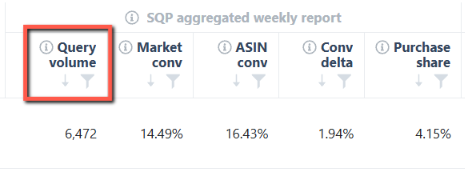
A keyword with high search volume may have more potential than a low-volume keyword, but demand alone isn’t enough.
Next, look at how well your product converts.
Compare ASIN Conversion with Market Conversion
Compare:
- ASIN Conversion – How well your product converts for the query.
- Market Conversion – How well the overall market converts.
- Conversion Delta – The difference between your product and the market.
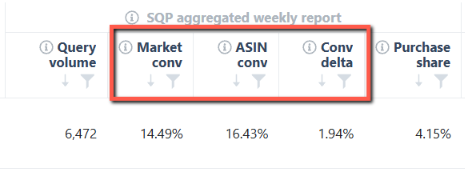
A positive Conversion Delta means your ASIN is converting better than the market for the selected period.
For example:
A keyword has high search volume, your ASIN converts better than the market, but your product has a relatively low purchase share.
This could indicate an opportunity to capture more demand.
[drawer]Check your ranking
Next, review:
- Organic Rank
- Ads Rank
- 7-Day Average
- 14-Day Average
- Ranking Trend
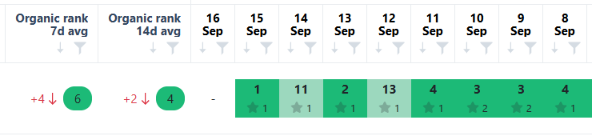
Look for keywords where your product has good conversion potential but still has room to improve its organic visibility.
[drawer]Check profitability
Before increasing advertising activity, review the keyword’s financial performance.
Consider:
- P&L
Check whether the keyword is contributing positively to your product’s profitability. - ACOS
Look at how efficiently your advertising spend is generating sales. - Break-Even Bid
The Break-Even Bid helps you determine the bid level associated with your break-even point using the available data.
A keyword with strong demand and conversion may still be a poor opportunity if the advertising cost required to compete makes it unprofitable.
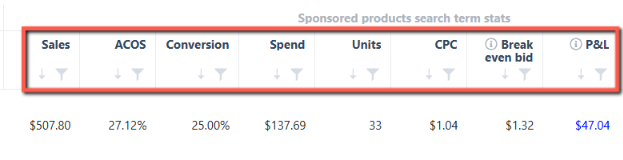
The Keyword Ranking page uses profitability and ranking signals such as positive P&L, conversion rate, Break-Even Bid, ACOS, and ranking performance to help identify keywords with potential
[drawer]Launch an SKC from Keyword Ranking
Once you’ve identified a keyword with potential, you can create a Single Keyword Campaign directly from Keyword Ranking.
Step 1: Find the keyword
Identify a keyword with promising demand, conversion, ranking, and profitability metrics.
Step 2: Review the opportunity
Check:
- Organic Rank
- Ranking trend
- Query Volume
- ASIN Conversion
- Market Conversion
- Purchase Share
- P&L
- ACOS
- Break-Even Bid
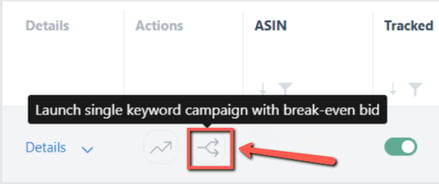
Step 3: Click Launch SKC
Select Launch SKC for the keyword.
Step 4: Review the campaign
You’ll be redirected to Mass Campaigns, where the keyword is pre-selected.
The keyword’s Break-Even Bid is used as the initial bid, which you can customize before creating the campaign.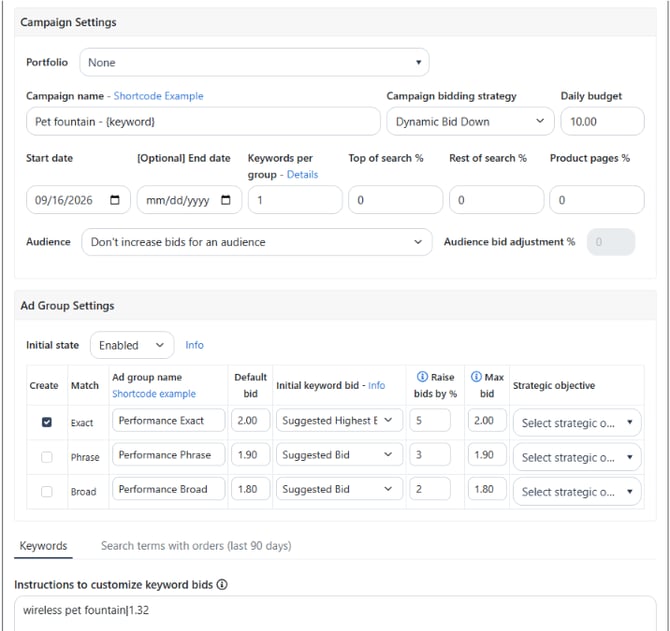
Step 5: Create the campaign
Review the campaign settings and make any necessary adjustments before launching it.
Use Keyword Ranking with Bidding Rules
On your campaigns, keyword ranking data can also be used as a condition in Bidding Rules.
For example, you can create rules that use a keyword’s organic or ads ranking to determine when a bid or keyword status should be adjusted.
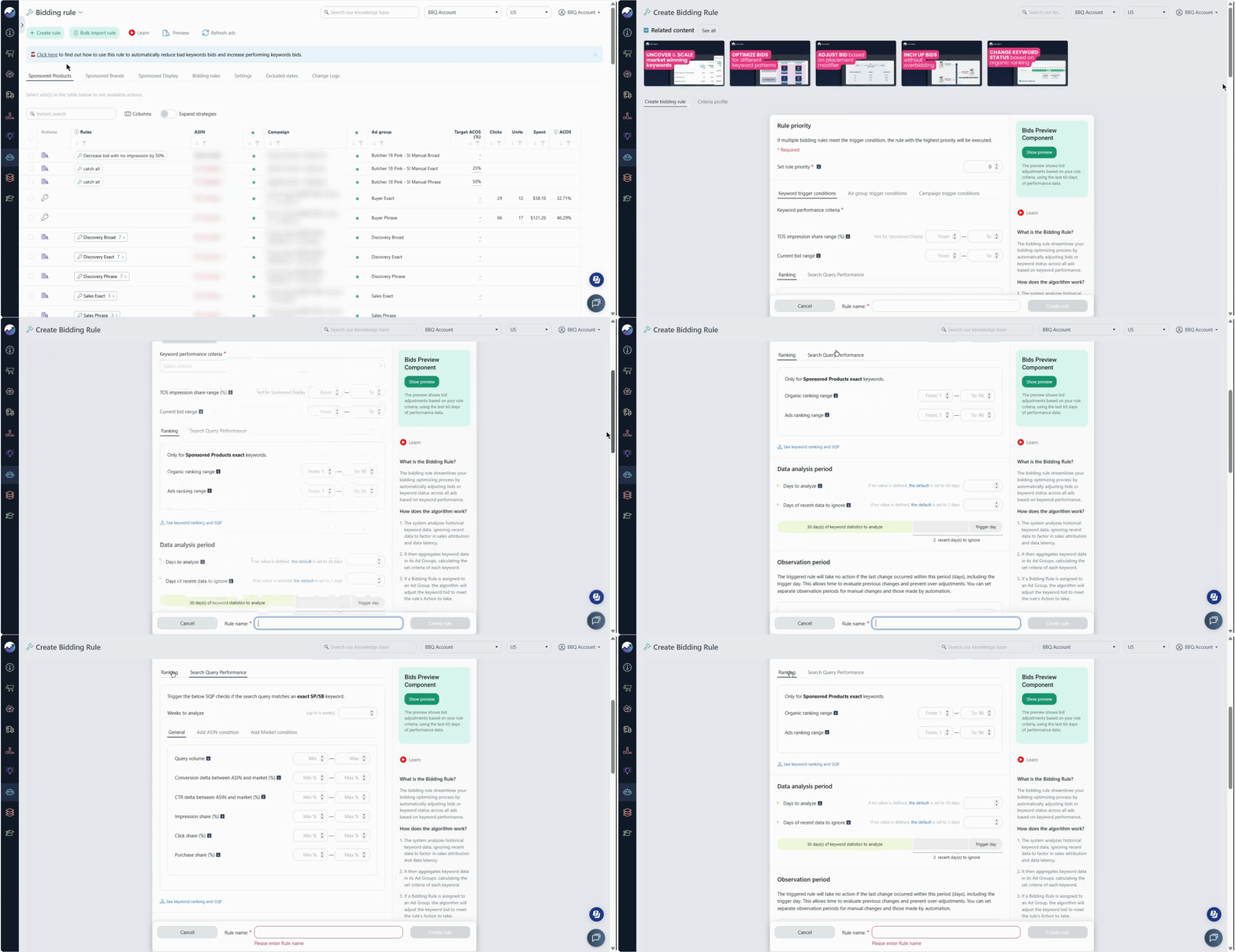
For more information on how to use the keyword rank data as a bidding condition, check Bidding Rule Conditions Based on Organic and Ads Ranking
For ranking conditions to apply:
- The keyword must be tracked in Keyword Ranking.
- Ranking conditions are designed for Sponsored Products exact-match keywords.
- They don’t apply to broad- or phrase-match keywords, ASIN targets, or Sponsored Brands and Sponsored Display campaigns.
This lets you move from manually analyzing ranking data to using ranking signals in your advertising strategy.