Tracking a keyword is only the first step. The real value comes from understanding what the ranking data means and what you should do with it.
This article explains the main information available in Keyword Ranking and how to use it to identify opportunities.
Navigation: Keyword Ranking
[drawer]Start with Organic Rank and Ads Rank
Begin by looking at where your product appears for each tracked keyword.
- Organic Rank shows your product’s organic search position.
- Ads Rank shows your Sponsored Products position.
A lower ranking number represents a better position.

For example:
|
Keyword |
Organic Rank |
Ads Rank |
|
wireless pet fountain |
#3 |
#2 |
In this example, the product has stronger paid visibility than organic visibility for the keyword.
Use both metrics to understand whether your visibility is primarily coming from advertising or organic search.
Don’t rely on a single day’s ranking
Keyword rankings can change from day to day.
Instead of focusing only on today’s number, use the 7-Day Average and 14-Day Average to see the bigger picture.
.png)
7-Day Average
Shows the average organic rank over the most recent 7 days.
14-Day Average
Shows the average organic rank over the most recent 14 days.
Trend
The trend compares the current-period average with the previous period.
Scale Insights calculates the trend as: Current Average Rank− Previous Average Rank
Therefore:
- A negative value means the ranking improved.
- A positive value means the ranking declined.
- No change means the ranking remained the same.
For example:
- Previous average: #20
- Current average: #15
- Trend: -5
Your average ranking improved by 5 positions.
Rolling averages help reduce the effect of daily fluctuations and give you a clearer view of ranking performance.
Note
Keywords with fewer than 7 days of ranking history won’t have the full set of averages and trend indicators. Keywords with 7–13 days of history can have a 7-day average and trend, while the 14-day metrics aren’t available yet.
[drawer]Compare ranking with PPC performance
Ranking alone doesn’t tell you whether a keyword is valuable.
Compare your ranking with other performance metrics, such as:
- Sales
- Conversions
- Spend
- ACOS
- P&L
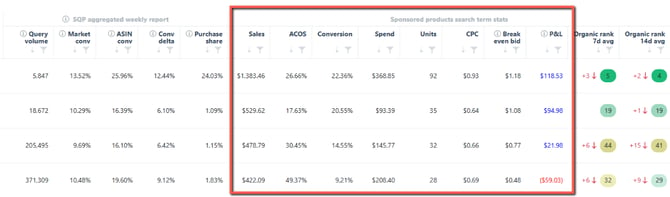
Use Keyword Ranking to understand the relationship between organic visibility and advertising.
For example, ask:
- Is my Ads Rank stronger than my Organic Rank?
- Did organic ranking improve while PPC performance increased?
- Is the keyword generating profitable sales?
- Is advertising spend justified by the resulting sales and ranking?
- Is my product converting well despite having a weak organic position?
A keyword ranking at #5 may look strong, but if it generates little sales and requires expensive advertising, it may not be as valuable as a keyword ranking at #20 with strong conversion and profitable sales.
[drawer]Use SQP data to understand keyword opportunities
Keyword Ranking integrates Search Query Performance (SQP) data so you can compare your product’s performance with the overall market.
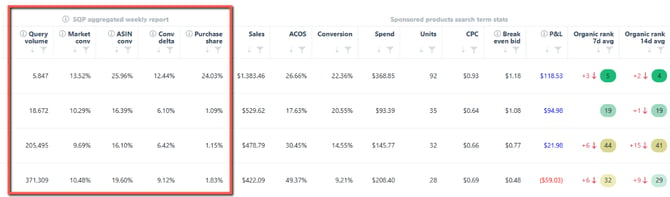
Key metrics include:
- Query Volume – How often customers search for the query during the selected period.
- Market Conversion – The market’s conversion rate for the query.
- ASIN Conversion – Your ASIN’s conversion rate.
- Conversion Delta – The difference between your ASIN’s conversion and the market.
- Purchase Share – Your ASIN’s share of purchases for the query.
You can also access additional SQP information in the keyword details, including impression, click, and purchase share; ASIN and market performance; median price; CTR; and query score.

Find potential ranking opportunities
Look for keywords where several positive signals come together.
For example:
- High Query Volume
- ASIN Conversion higher than Market Conversion
- Low Purchase Share
- Weak or improving Organic Rank
This combination may indicate that customers are searching for the product and converting well, but the product isn’t capturing as much of the available demand as it could.
No single metric automatically means a keyword is a good opportunity. Look at the complete picture.
[drawer]Look at the keyword trend
Use the keyword trend view to see how ranking and performance change over time.
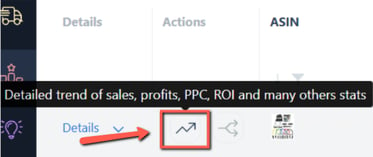

Use this to answer questions such as:
-
Is my organic ranking improving?
-
Did my ranking improve after increasing PPC activity?
-
Is ranking improving while profitability remains healthy?
-
Did my ranking decline at the same time as sales or PPC performance changed?
The goal isn’t simply to get a better ranking. You want to understand whether the ranking improvement is also contributing to better business results.
[drawer]A simple framework for analyzing a keyword
When reviewing a keyword, work through these questions:
1. Is there demand?
Check Query Volume.
2. Does my product convert?
Compare ASIN Conversion with Market Conversion.
3. How visible is my product?
Review Organic Rank, Ads Rank, and ranking trends.
4. Is my visibility improving?
Review the 7-Day Average, 14-Day Average, and Trend.
5. Is the keyword profitable?
Review P&L, ACOS, spend, and sales.
6. Is there an opportunity?
Look for strong demand and conversion combined with room to improve visibility or purchase share.
Once you’ve identified a promising keyword, you can move to the next step: deciding whether to increase advertising activity or launch an SKC.