
Moving from manual optimization to automation doesn't mean you need to change everything at once. With Scale Insights, you can start with a few rules, automate tasks you already perform manually, or rebuild your campaign structure if you're ready for a fresh start.
Choose the approach that best fits your current campaigns and advertising goals.
[drawer]Option 1: Start Fresh with a New Campaign Structure
Choose this approach if you want to rebuild your campaigns and incorporate automation from the beginning.
If your current campaigns are difficult to manage or no longer align with your advertising goals, starting fresh may be worth considering.
Scale Insights offers two approaches to help you build a new campaign structure:
- Fully Managed Campaigns (FMC): Use the FMC setup to help structure your advertising campaigns.
- Split Keywords to Campaigns (SKC): Organize keywords into separate campaigns based on your targeting strategy.
During setup, review the available settings and select the configuration that fits your advertising goals.
Here's a quick walkthrough on how to create Fully Managed Campaigns (FMC).
Before you begin: Review your existing campaigns and their performance before making changes. Pausing campaigns can affect sales and advertising coverage, so don't pause them automatically just because you're creating new ones. Plan the transition to avoid unnecessary disruption.
[drawer]Option 2: Start with Preset Automation Rules
Choose this approach if you're new to automation and want to optimize existing campaigns without rebuilding them.
Navigation: Automation > Algorithms
Preset rules are a practical starting point. They help you automate common optimization tasks without having to build every rule from scratch.
Start with a task you regularly perform manually, such as reducing unnecessary ad spend. Choose a suitable preset rule, review its conditions, and assign it to a small group of ads first.
Before expanding its use, check whether the rule's conditions and proposed actions align with your advertising strategy.
Once you're comfortable with how the rule works, you can apply it to more ads and explore additional rules.
Watch: 4 Quick Ways to Eliminate Unnecessary Ad Spend
Follow this walkthrough to learn how to select a preset rule, and edit or duplicate its settings.
To assign preset rules and automate your ads, check here: How to Automate Your Ads
[drawer]Option 3: Automate Your Existing Advertising Strategy
Choose this approach if you already have an optimization strategy and want to automate repetitive tasks.
Navigation: Automation > Algorithms
You don't need to change your entire advertising strategy to start using automation. Instead, identify tasks you regularly perform manually and turn those decisions into rules.
For example, if you regularly check search terms and negate those with at least 20 clicks but no orders, you can create a Negative Rule to automate that process.
Step 1: Identify a Task to Automate
Start with one repetitive task that has clear conditions and an action you can define.
For example:
- Task: Identify search terms that receive clicks but generate no orders.
- Condition: At least 20 clicks and zero orders.
- Action: Add the qualifying search terms as negative targets.
Choose a task you understand well so you can easily verify whether the rule behaves as expected.
Step 2: Create a Rule
In Scale Insights, open the relevant algorithm and create a rule that reflects your existing optimization strategy.
For this example, we’ll use a Negative Rule. Set the trigger conditions and actions based on your requirements.
Follow this walkthrough to create and apply a Negative Rule to your ads.
Related Articles:
Overview of Each Automation Algorithm
How to Create and Use a Criteria Profile
How Do Algorithms Analyze Data?
Step 3: Test the Rule on a Small Group of Ads
Instead of applying the rule across your entire account immediately, start with a small group of relevant ads.
This lets you evaluate how the rule behaves before expanding its coverage.
To assign rules and automate your ads, check here: How to Automate Your Ads
Step 4: Preview the Proposed Actions
Before relying on the rule, review its proposed changes and confirm that they match your expectations.
If the results differ from your intended strategy, adjust the rule conditions or settings and preview the changes again.
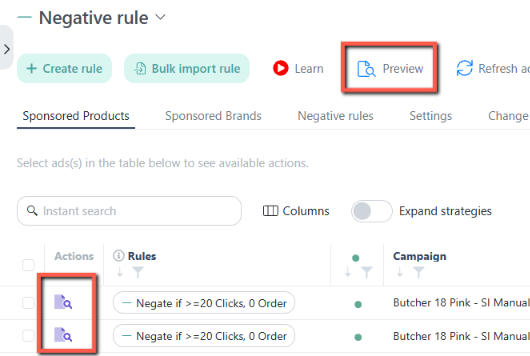
Step 5: Review the Results in Change Logs
After the rule runs, use Change Logs to review the automation actions taken.
Navigation: Automation > Change Logs
Check which changes were made and whether they align with your strategy. Where relevant, review the metrics recorded at the time of each change to better understand the context.
If the rule isn't behaving as expected, revisit its conditions and settings before applying it to more ads.
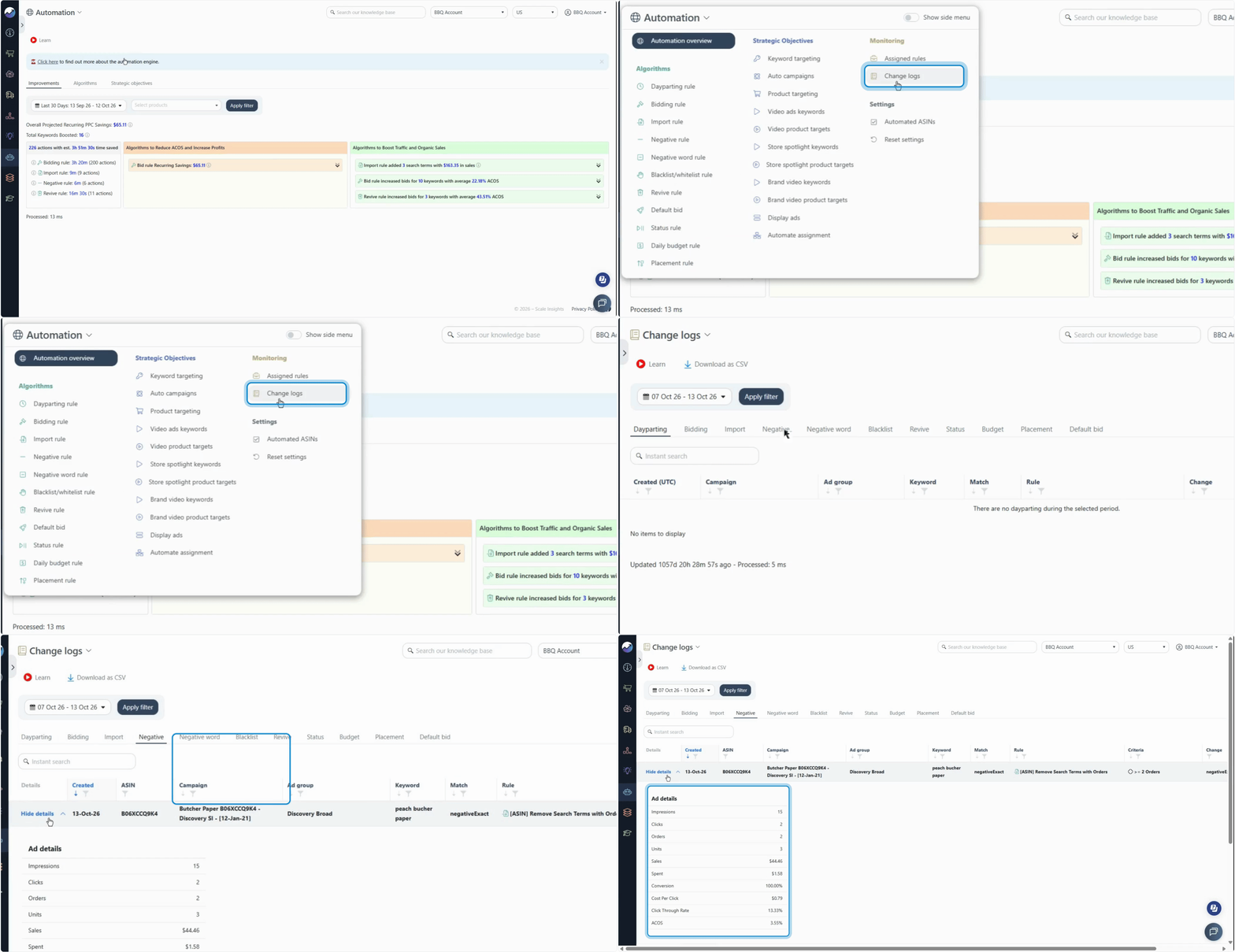
To learn how to check the changes made by the rule, go to: Reviewing Automation Actions Taken
Step 6: Expand Your Automation Gradually
Once you're confident that the rule is working as intended, apply it to more relevant ads.
You can then repeat the process for other tasks, gradually automating more of your existing optimization strategy.
Step 7: Group Related Rules into a Strategic Objective
As your automation setup grows, managing individual rules across multiple ad groups can become time-consuming.
A Strategic Objective lets you group related automation rules into a reusable strategy and assign that strategy to multiple ad groups.
For example, you could create a Strategic Objective that combines rules for managing bids, reducing wasted ad spend, and improving keyword targeting. You can then assign the same strategy to the relevant ad groups instead of configuring each rule separately for every group.
Learn how to create and apply Strategic Objectives here: Using Strategic Objectives
What's Next?
The best way to transition to automation is to start with an approach that fits your current needs, verify the results, and expand as you gain confidence.
- Start small: Test new rules on a limited group of ads before expanding.
- Review your settings: Make sure the conditions and actions reflect your advertising goals.
- Monitor automation actions: Use Change Logs to understand what your rules have changed.
- Expand thoughtfully: Add more rules and ad groups as you become comfortable with your setup.
You don't have to automate everything at once. Start with one task, build on what works, and gradually develop an automation strategy that supports your advertising goals.