
Not every ad group should necessarily be optimized in the same way.
For example, you may use different strategies for single-keyword campaigns, product-targeting campaigns, or campaigns with placement modifiers.
Ad Group Signals let you tell Scale Optimizer which types of ad groups a recommendation should apply to.
Think of a Signal as a filter or guardrail that helps Scale Optimizer identify the ad groups that match your optimization strategy.
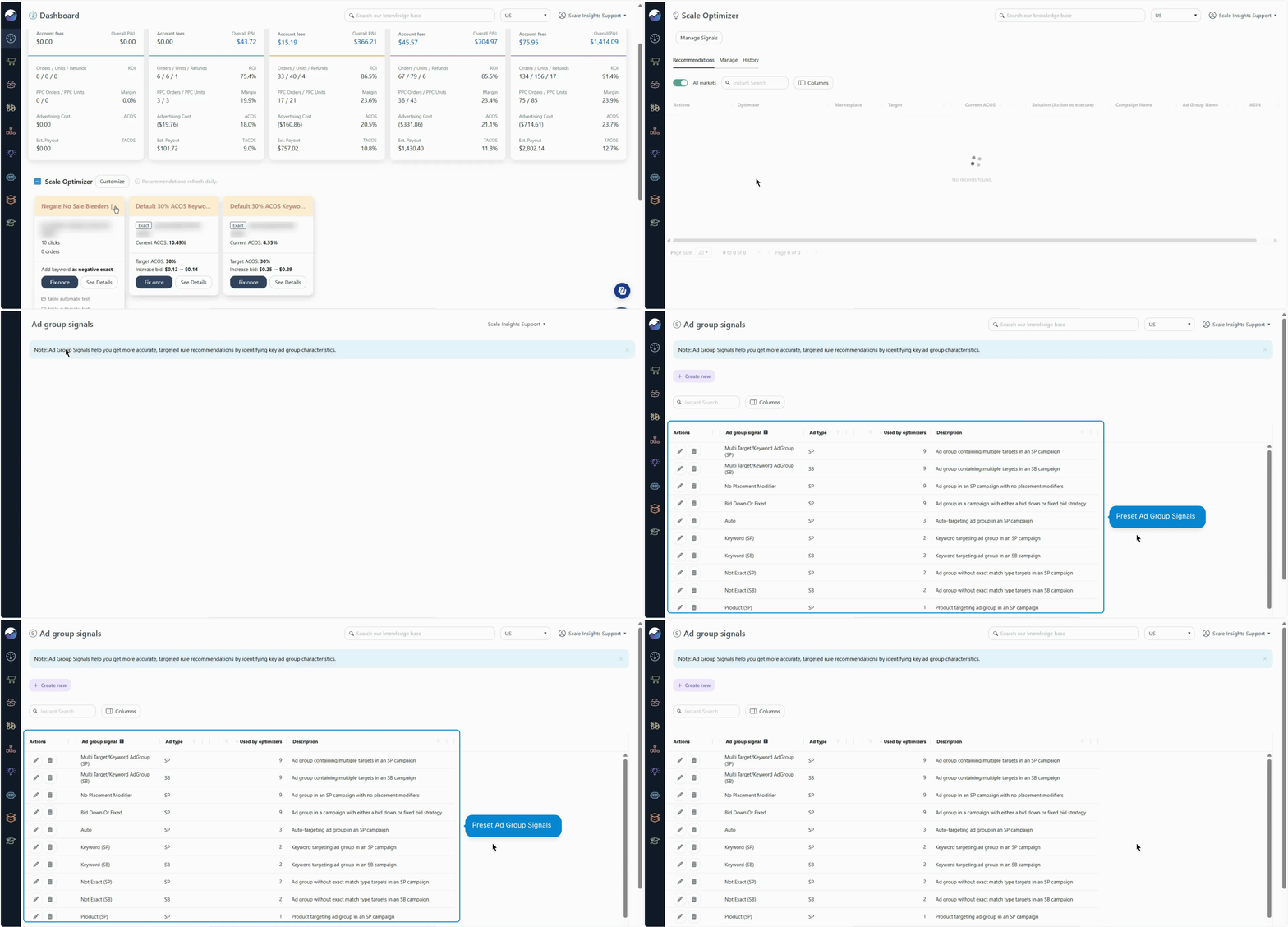
What is an Ad Group Signal?
An Ad Group Signal is a set of conditions that defines the type of ad group that can qualify for a Scale Optimizer recommendation.
For example, you could create a Signal for ad groups that:
- Use keyword targeting
- Use Exact Match keywords
- Have a specific number of targets
- Use or don't use placement modifiers
Only ad groups that meet the defined conditions can qualify for a recommendation using that Signal.
Why use Ad Group Signals?
Your account may contain many different campaign and ad group structures.
A recommendation that makes sense for one structure may not make sense for another.
Signals give you more control over where an optimization strategy is applied.
For example, you might want one recommendation to apply only to:
- Single-keyword ad groups
- Exact Match keywords
- Ad groups with multiple targets
- Ad groups using placement modifiers
- A specific type of targeting
Instead of applying the recommendation broadly, you can use a Signal to narrow down the eligible ad groups.
[drawer]How Ad Group Signals Work with Scale Optimizer
When Ad Group Signals are enabled:
- Scale Optimizer first evaluates the selected Sponsored Ad type.
- The selected Ad Group Signals are applied as filters.
- Only ad groups that meet all signal criteria are included in recommendations.
- Ad groups that do not match the signal conditions are excluded from optimization actions.
Signals are attached to Scale Optimizer recommendations.
To use one:
- Go to Scale Optimizer → Customize.
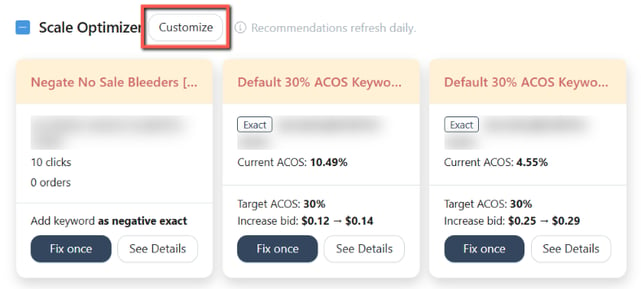
- Open the Manage tab.
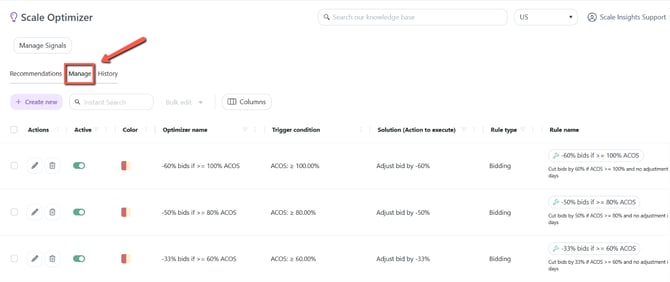
- Create a new Optimizer or edit an existing one.
- Add the relevant SP, SB, or SD Ad Group Signals. You can assign multiple Signals to the same ad type.
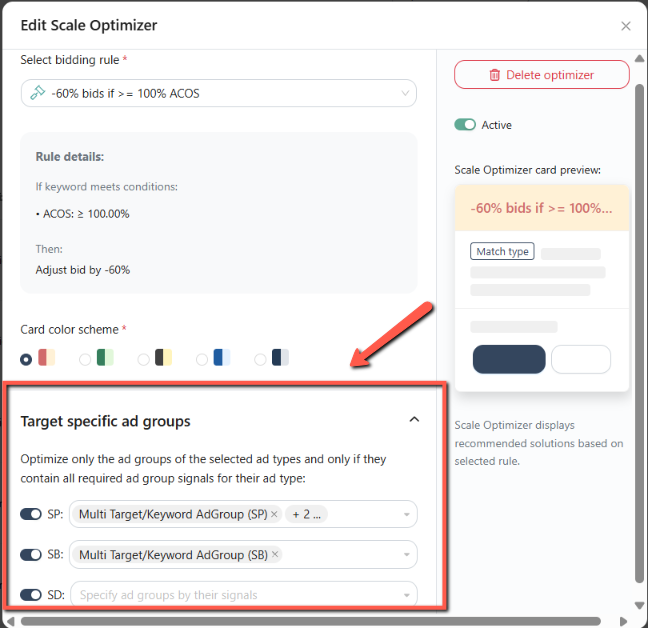
- Save the Optimizer.
Scale Optimizer then uses the Signal criteria when determining which ad groups qualify.
[drawer]All Signal criteria must match
Suppose you create a Signal with:
- Keyword targeting
- Exact Match
- No placement modifier
An ad group must meet all three conditions to qualify.
| Ad group | Keyword targeting | Exact Match | No placement modifier | Qualifies? |
|---|---|---|---|---|
| Ad Group A | ✓ | ✓ | ✓ | ✓ |
| Ad Group B | ✓ | ✓ | ✕ | ✕ |
| Ad Group C | ✓ | ✕ | ✓ | ✕ |
| Ad Group D | ✕ | — | ✓ | ✕ |
This means you can create more precise groups of ad groups for your optimization strategies.
What happens when an ad group doesn't match?
If an ad group does not meet the conditions defined by the Signal, it is not included in that recommendation.
This does not necessarily mean the ad group is performing poorly or that no optimization is available.
It simply means that the ad group does not fit the conditions you defined for that recommendation.
Example: Single-keyword Exact Match
Suppose you want a recommendation to apply only to ad groups that contain a single Exact Match keyword.
You could create a Signal based on:
Targeting type: Keywords
Match type: Exact Match
Number of targets: 1
The recommendation can then be limited to ad groups matching those conditions.
An ad group using Phrase Match or multiple targets would not qualify.
This can be useful when you have different optimization strategies for different campaign structures.
Can I use multiple Signals?
Yes.
A Scale Optimizer recommendation can include multiple Signals for the same Sponsored Ad type.
However, the selected Signals need to describe compatible ad groups.
Example of conflicting Signals
One Signal might identify:
Keyword-targeted ad groups
Another might identify:
Product-targeted ad groups
These describe different targeting structures and cannot be combined as though an ad group must satisfy both.
When Signals conflict, Scale Optimizer displays an error.
If you need different optimization strategies for these structures, consider creating separate recommendations.
[drawer]Signals are specific to the Sponsored Ad type
Signals are associated with their corresponding ad type:
- Sponsored Products (SP)
- Sponsored Brands (SB)
- Sponsored Display (SD)
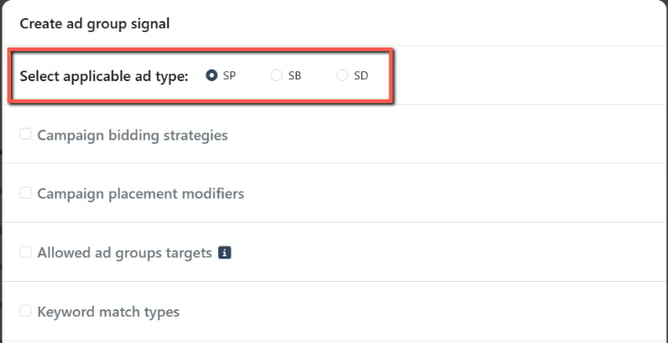
The available Signal criteria can vary depending on the ad type you select.
This allows you to build Signal strategies appropriate to each advertising type.
What should I do next?
Now that you understand what Signals do and how they filter eligible ad groups, you can create your own.