
Navigation: Automation > Placement Rule
The Placement rule automatically adjusts your campaign's placement settings based on campaign or placement performance.

It can help you increase exposure where your campaign performs well and reduce exposure where performance is weaker.
You can create separate rules for:
- Top of Search (TOS) — ads shown at the top of search results
- Rest of Search (ROS) — ads shown elsewhere in search results
- Product Pages (PP) — ads shown on product detail pages
[drawer]How Does the Placement Rule Work?
The Placement Rule analyzes historical placement performance and checks whether the conditions you've configured are met.
For example, you could create a rule that says:
If TOS ACOS is below 20%, increase the TOS placement by 20%.
When the rule runs, the algorithm evaluates the campaign or placement data. If the criteria are met, the configured adjustment is applied.
Important:
You can create separate rules for TOS, ROS, and PP. These rules can work together and, depending on their configuration, multiple placement rules can execute during the same cycle.
For more information, see How Multiple Placement Rules Work Together.
Current Placement % vs Rule's Placement % Value
The algorithm will adjust the placement percentage (increase/decrease) based on the Placement % Value you set.
If the current placement % is lower than the Placement % Value, it will be increased, and vice versa.
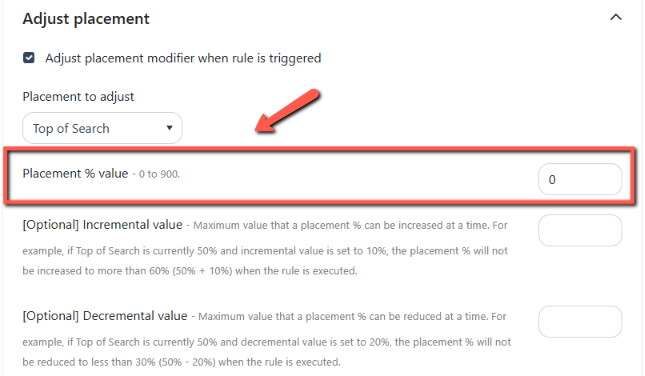
Whenever the algorithm executes, it adjusts the placement % gradually based on the optional incremental/decremental value and the criteria set.
Increment Value will tell the system how much the rule can increase a placement % at a time.
-
Scenario 1 (Increment):
-
A campaign TOS is currently at 100%.
-
The rule's incremental value is 30%.
-
The rule's placement % value is 200%.
-
Campaign Placement Criteria: >= 30 Orders; >=15% Conversion; <=80% ACOS
-
-
Once the placement performance meets the rule's criteria, the algorithm will increase the TOS % by 30% daily until it reaches 200%.
Decrement Value will tell the system how much the rule can decrease a placement % at a time.
-
Scenario 2 (Decrement):
-
A campaign TOS is currently at 300%.
-
The rule's decremental value is 50%.
-
The rule's placement % value is 100%.
-
Campaign Placement Criteria: <=10% Conversion; >= 100% ACOS
-
-
Once the placement performance meets the rule's criteria, the algorithm will decrease the TOS % by 50% daily until it reaches 100%.
Note:
Consider having a default "catch-all" placement rule that will decrease TOS % until it becomes 0% if the campaign stops performing.
[drawer]How does the Placement Rule Analyze Data?
Placement Rule uses historical data to evaluate placement performance.
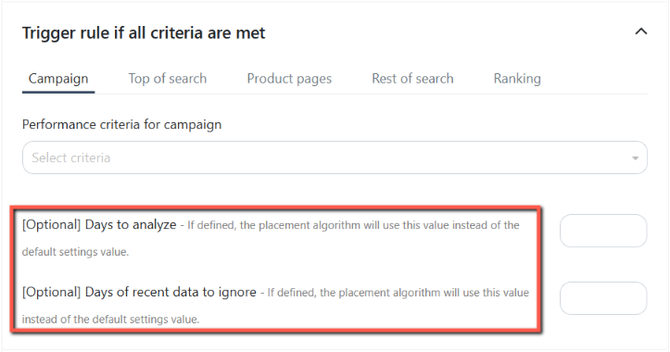
You can control the period of data used for the analysis with two settings:
Days to Analyze
Defines how many days of historical data the Placement Rule uses for its analysis.
If this value is defined inside the rule, the Placement Rule uses it instead of the default setting.
Days of Recent Data to Ignore
Defines how many of the most recent days of data should be excluded from the analysis.
If this value is defined inside the rule, the Placement Rule uses it instead of the default setting.
For example, if you set:
- Days to Analyze: 7 days
- Days of Recent Data to Ignore: 1 day
The Placement Rule analyzes 7 days of campaign placement statistics, while excluding the most recent day.
These settings allow you to control which historical data is considered when the Placement Rule evaluates your placement performance.
Note: You can analyze up to 180 days of historical data and customize the number of days to skip.
Learn how the Placement Rule analyzes historical data: How Do Algorithms Analyze Data?
[drawer]Placement Rule vs. Keyword Bidding
A Placement rule can also include a keyword bid adjustment.
Placement adjustments change the percentage applied to a specific campaign placement, such as TOS, ROS, or PP.
Keyword bid adjustments change the bids of individual keywords.
When multiple rules include keyword bid adjustments, the algorithm evaluates them based on rule priority and eligibility.
For details on how multiple rules interact, including priority and observation settings, see How Multiple Placement Rules Work Together.
[drawer]How often does the Placement Rule Execute?
By default, the placement rule executes daily.
You can configure the global settings for the Placement Rule’s execution frequency, days to analyze, and days to ignore from the Settings tab.
These settings apply to all Placement Rules unless an individual rule has its own settings.

To customize the data analysis period for a specific rule, set the Days to Analyze and Days to Ignore within that rule.
If these settings are not configured at the rule level, the rule will follow the global settings.
You can also configure Days to Observe, which determines how recent a placement change can be before it prevents the rule from making another adjustment.
You can choose to observe changes to Any Placement or This Rule's Placement Only.
