What is Scale Insights MCP?
Scale Insights MCP (Model Context Protocol) securely connects your Scale Insights account to supported AI applications, allowing them to answer questions using your advertising data.
Instead of navigating reports manually, you can simply ask questions like:
- How did my campaigns perform yesterday?
- Which keywords are wasting spend?
- What products should I focus on this week?
- Summarize my account performance.
Your AI application accesses your Scale Insights data securely and provides insights in plain English.
Supported AI Applications
Scale Insights MCP currently supports:
- Claude
- ChatGPT
- Claude Desktop
- Cursor / VS Code
Additional MCP-compatible AI applications may be supported in future releases.
What is the Scale Insights Skill?
The Scale Insights Skill is an optional companion that teaches your AI application how to better understand Scale Insights data.
It unlocks built-in prompts, shortcuts, and richer AI-powered analysis.
What Does the Skill Do?
The Scale Insights Skill teaches your AI application:
- How to analyze Scale Insights reports
- Common Amazon PPC workflows
- Specialized prompts
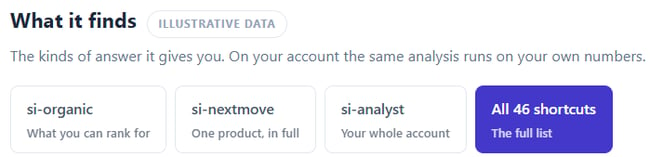
- 46 built-in shortcuts
- The si-help command
Built-in Shortcuts
The Skill includes 46 built-in prompts.
Examples include:
- Writing for me in my account
- Give me my weekly account report
- Diagnose my account
- Why did my ACOS change?
- What's the next move for my ASIN?
- Did my wasted ad spend change?
You can also browse and copy prompts directly from the LLM Skill page.
Note:
Even without the Skill installed, you can copy and paste any prompt from the LLM Skill page into your AI application.
Installing the Skill makes these prompts available automatically through si-help and other shortcuts.
How to Access Scale Insights MCP
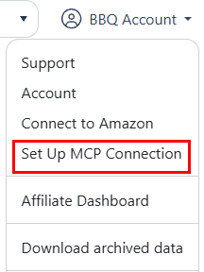
1. Log in to your Scale Insights account. From the account dropdown menu, select Set Up MCP Connection.
2. Connect Scale Insights MCP
-
Open the Connect MCP tab and select your preferred AI application (e.g., ChatGPT, Claude, Claude Desktop, or Cursor).
-
Follow the on-screen instructions to connect your Scale Insights account.

-
Open the LLM Skill tab and download the latest version of the Scale Insights Skill.
-
Follow the installation instructions for your AI application to enable the Skill and unlock additional prompts, shortcuts, and enhanced AI capabilities.

Once the setup is complete, open your AI application and ask a simple question, such as:
- Show my account summary.
- Which campaigns have the highest ACOS?
- What changed yesterday?
If your Scale Insights data is returned successfully, your setup is complete and you're ready to start using Scale Insights MCP.
5. Review the Changelog for the latest improvements.
Visit the Changelog tab to view the latest feature enhancements, new Skills, bug fixes, and other improvements.
We recommend checking it periodically to ensure you're using the latest version of the Scale Insights Skill.

What You'll See
After connecting, your AI application can retrieve information such as:
- Campaign performance
- Keyword insights
- Search term analysis
- Budget recommendations
- Product opportunities
Scale Insights Skill Changelog
The Scale Insights Skill is updated regularly with new prompts, analysis improvements, and reporting capabilities.
The Changelog page lists every released version so you can see what's new before updating.
What's Included
Each release notes:
- New AI capabilities
- Improved reports
- New prompt shortcuts
- Better recommendations
- Bug fixes
- Performance improvements
Keeping Your Skill Updated
We recommend downloading the latest version whenever a new release becomes available.
Each version builds upon previous improvements to provide more accurate insights and better recommendations.
Related Resources
Looking to learn more or get started?
-
Scale Insights MCP Portal
Access the MCP setup page to connect your AI application, download the latest Scale Insights Skill, and view the latest changelog.
https://portal.scaleinsights.com/Settings/MCPConnect
-
Introducing Scale Insights MCP
Learn more about the benefits of Scale Insights MCP, how it works, and how AI can help you analyze your Amazon advertising data.
https://blog.scaleinsights.com/introducing-scale-insights-mcp