New Features
1. Main Dashboard: Introduced the Scale Optimizer
Navigation path: Main Dashboard
We’ve launched the Scale Optimizer feature on the main dashboard.
This tool automatically reviews keyword performance for ad groups without assigned bidding rules and suggests up to five daily actions.
-
Recommendations may include adjustments to a keyword’s bid or status, depending on the conditions set by your active Optimizer.
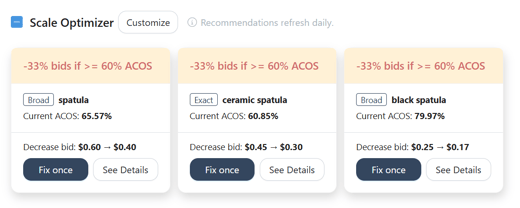
Click “Fix once” to instantly apply the suggested keyword adjustment.
All changes will appear in the Ads Insights' Manual Change history page.
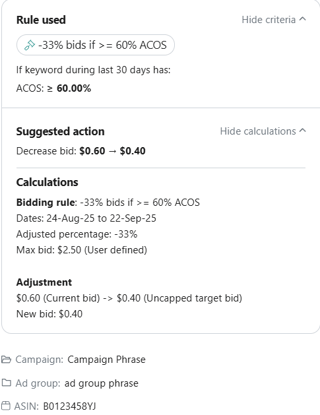
Select “See Details” to view the bid calculation, keyword stats, and the corresponding ad group/campaign.
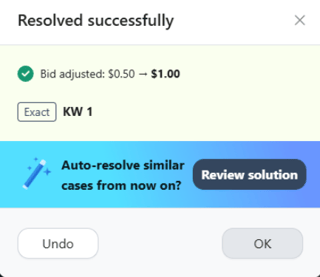
 Use “Undo” to revert the keyword change if needed.
You can also assign a bidding rule to the ad group by clicking “Review solution.”
2. Strategic Objectives: Added the Negative Word and Blacklist/Whitelist rules on Video Ads Strategic Objective
Navigation path: Algorithms > Strategic Objectives > Video Ads
You can now apply Blacklist/Whitelist and Negative Word rules to your Video Ads Strategic Objectives.
Once activated, the system will automatically add non-performing and blacklisted keywords to the ad group's negative list.
.png?width=520&height=297&name=Scale%20Insights%20Video%20Ads%20SO(1).png)
Enhancements
1. Strategic Objectives: Enabled Column Filters on the Bulk Template
Navigation path: Algorithms > Strategic Objectives > Bulk Upload Objectives
We have enabled column filtering in the Strategic Objective bulk template, allowing you to filter ad groups or campaigns by status, portfolio, or key metrics.
This makes it easier to update Strategic Objectives across multiple ad groups at once, which is especially helpful for managing larger accounts.
.png?width=620&height=169&name=Scale-20Insights-20Filter-20SO(1).png)
2. Mass Campaigns: Added Search function for Strategic Objectives
Navigation path: Mass Campaigns
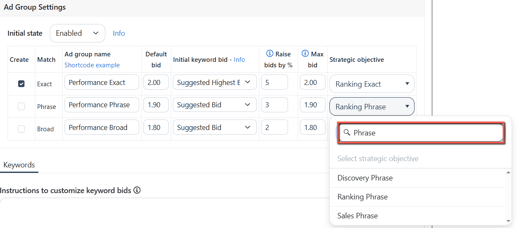
We’ve added a Search feature in the Mass Campaign Strategic Objective settings.
Making it easier and faster to locate and assign the right strategic objective to your ad groups, saving time and reducing errors.
 3. Ads Insights: Added "Active" and "Paused" ASINs columns
Navigation path: Ads Insights > Link ads with ASINs
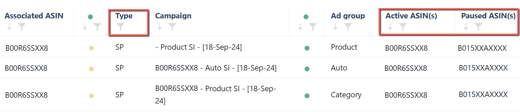
We’ve added “Active ASIN(s)” and “Paused ASIN(s)” columns on the Link Ads with ASINs page to easily view each ad group’s ASIN status.
Additionally, we have introduced the "Type" column to help you identify the linked sponsored ad type.
Bug Fixes
1. Negative rule: Fixed the duplicate Negative Search Terms issue
-
Resolved an issue where a search term could be added multiple times as a negative target within a campaign.
-
The system now prevents duplicate negations at the campaign level.
2. Automation: Fixed incorrect classification of Sponsored Product Keyword Group targets
-
We fixed the misclassification of Keyword Group targets as Product Targeting campaigns.
-
They will now appear on Keyword Targeting Strategic Objectives, ensuring the import and negative rules work correctly by targeting type.
3. Ads Insights: Resolved Column Filter issues
-
The input field is now disabled as intended when using “Has value,” “Has no value,” “Is null,” and “Is not null.”
-
Filter results now update correctly after deselecting items with “Select All.”
-
Search Terms page tables now return data, including ad groups with no orders, when filtered using "≤ 0".