New Features
1. Blacklist/Whitelist Rule: Enabled for Sponsored Brands Video Keywords campaigns
Navigation path: Algorithms > Blacklist/Whitelist rule
The Blacklist/Whitelist rule is now supported for Sponsored Brands Video Keywords campaigns.
Once activated at the ad group level, any keywords or product targets specified in the list will automatically be applied as negative targets within that ad group.
.png?width=520&height=241&name=Scale%20Insigths%20SB%20Video%20Blacklist(1).png) 2. Negative Word Rule: Enabled for the Sponsored Brands Video Keywords campaigns
2. Negative Word Rule: Enabled for the Sponsored Brands Video Keywords campaigns
Navigation path: Algorithms > Negative Word rule
The Negative Word Rule is now supported for Sponsored Brands Video Keywords campaigns.
With this enhancement, irrelevant single-word search terms that trigger your ads will be automatically negated, helping reduce wasted ad spend.
.png?width=520&height=219&name=Scale%20Insigths%20SB%20Video%20Negative%20word%20rule(3).png)
Enhancements
1. Negative Rule: Added Campaign-level negation for Sponsored Product campaigns
Navigation path: Algorithms > Negative rule
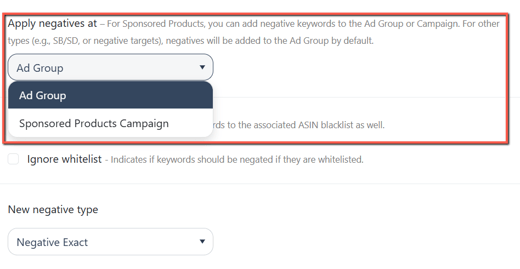
You can now negate search terms not only at the Ad Group level but also at the Campaign level.
In the "Apply negatives at" section, you can choose whether to apply negative terms at the Ad Group or Campaign level, giving you greater control over targeting.
❗Note:
This feature is available only for Sponsored Products campaigns. Negative keywords will always be applied at the Ad Group level for Sponsored Brands campaigns.
When a Negative Rule is assigned to a Sponsored Products Product Targeting campaign:
-
Keyword search terms are automatically negated at the Campaign level.
-
The negation is applied at the Ad Group level if the search term is an ASIN target.
2. Negative Rule: Enabled "Add to Blacklist" for Sponsored Brands campaigns
Navigation path: Algorithms > Negative rule
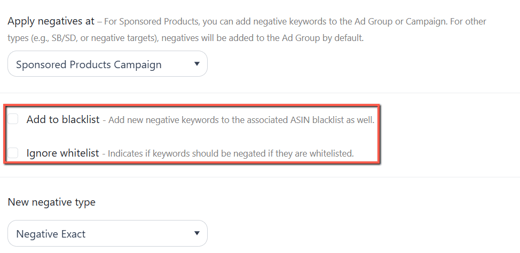
The "Add to blacklist" and "Ignore whitelist" options are now supported for Sponsored Brands campaigns. Previously, these options were available only for Sponsored Products.
When “Add to blacklist” is enabled, any negated keywords or targets from Sponsored Brands campaigns will be added to the product’s blacklist.
3. Negative Rule: Add negated Product Targets to the Blacklist
Navigation path: Algorithms > Negative rule
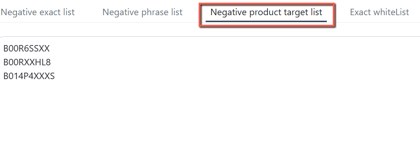
When the “Add to blacklist” option is enabled, any negated ASIN search terms from the Negative Rule will be captured.
These will then be added to the product's Negative Product Target list within the Blacklist.
Bug Fixes
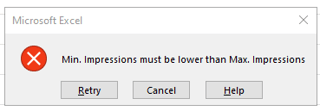
Criteria Profile: Fixed issue where the Minimum value could exceed the Maximum value
-
We have added a validation to ensure the minimum criteria value cannot exceed the maximum value.
-
The system will return an error message if such a configuration is detected.