
New Features
1. Import Rule: Enabled Manual Rule Execution
Navigation path: Automation > Import rule > Preview
We’ve added the ability to manually execute Import rules directly from the Preview or individual Ad Group Preview pages.
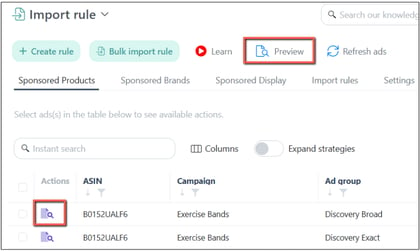
You can now:
-
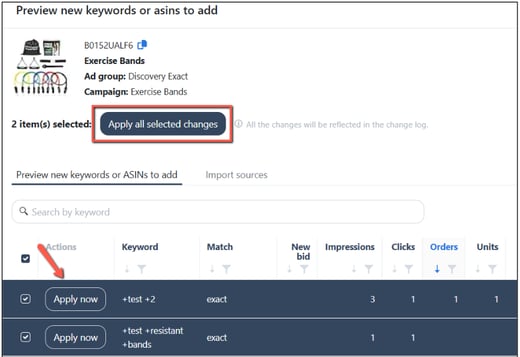
Apply rule changes immediately without waiting for the next scheduled run.
-
Select specific ad groups or bulk-apply changes to all ad groups at once.
This enhancement gives you greater control and flexibility to act quickly on performance insights and apply rule adjustments as needed.
All manual executions are automatically recorded in the Automation Changelog for transparency and tracking.
❗Note:
After manually applying changes, the ad group’s keyword/target will be removed from the preview page.
2. Negative Rule: Enabled Manual Rule Execution
Navigation path: Automation > Negative rule > Preview
You can also manually execute Negative rules directly from the Preview or the individual Ad Group Preview pages.
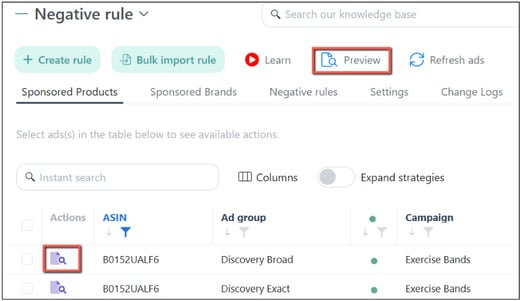
You can now:
-
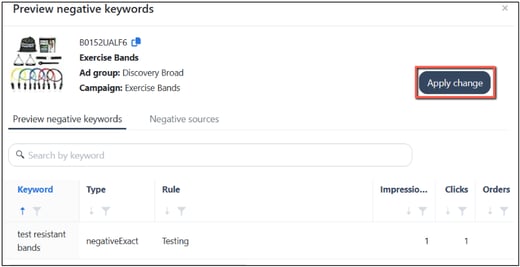
Apply rule changes immediately without waiting for the next scheduled run.
-
Select specific ad groups or bulk-apply changes to all ad groups at once.
This enhancement gives you greater control and flexibility to act quickly on performance insights and apply rule adjustments as needed.
All manual executions are automatically recorded in the Automation Changelog for transparency and tracking.
❗Note:
After manually applying changes, the ad group’s keyword/target will be removed from the preview page.
3. Ads Insights: Manually adjust the Keyword Bids based on the Suggested Bid
Navigation path: Ads Insights > Performance
You can now manually adjust keyword bids based on Amazon's suggested bid.
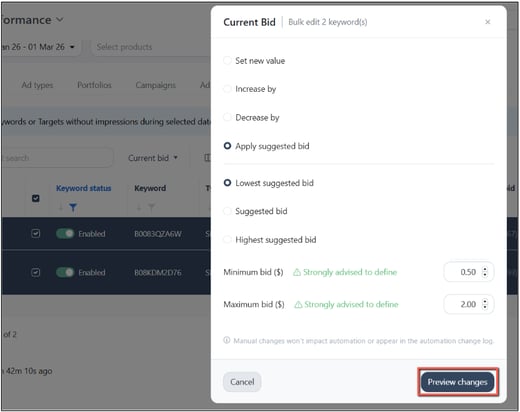
Select the keywords you want to adjust the bid for and choose "Current bid" under the bulk edit feature.
Choose either the Lowest suggested, Suggested, or Highest suggested bid.
Adding a minimum and maximum bid amount is recommended to prevent underbidding and overbidding.
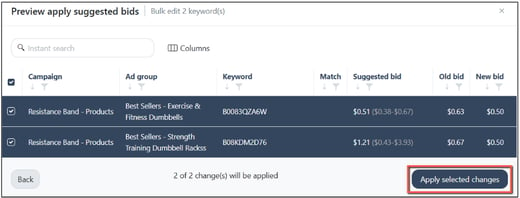
Check the box next to the keyword you want to apply bid changes to, then click the "Apply selected changes" button.
Enhancements
1. Mass Campaigns: Added Keyword and ASIN target validation
Navigation path: Mass Campaigns
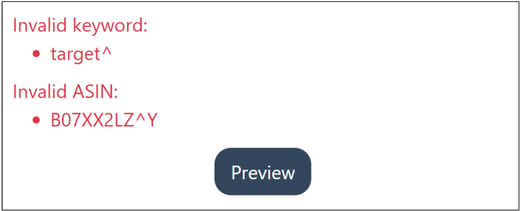
We’ve improved the Mass Campaign creation process by adding validation for keywords and ASINs with invalid characters.
With this update, validation issues are clearly highlighted, helping you quickly identify why a campaign wasn’t created successfully.
Error messages are displayed at the bottom of the page and must be resolved before you can proceed to the Preview page, ensuring a smoother campaign setup.
2. Keyword Ranking: Enhanced Keyword Ranking Bulk template
Navigation path: Keyword Ranking
We have improved the Bulk Upload Rank template on the Keyword Ranking page for better flexibility and control.
Key enhancements include:
-
Complete product and target coverage: All products and their associated targets are now included for bulk management.
-
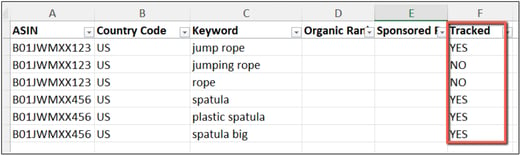
Tracked column options: Easily choose which keywords to include or exclude from tracking.
-
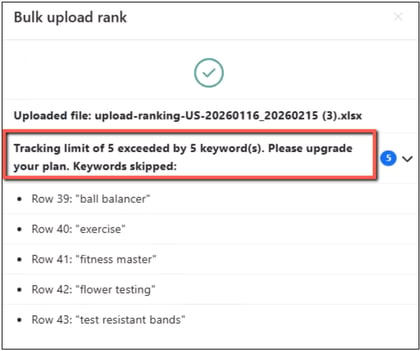
Plan limit safeguard: If your tracked keywords exceed your plan allowance, an error message will prompt you to upgrade.
3. Improved Access to Learning Videos
Navigation path: Automation, Ads Insights, Dayparting Trend
We’ve enhanced video visibility and the overall viewing on several pages, including Automation and Ads Insights.
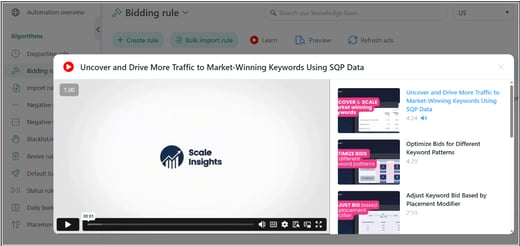
When you click the "Learn" button, the videos will now open in a pop-up modal within the portal.
This modal includes a playlist on the right side, allowing you to easily switch between related videos without leaving the page.
These improvements provide a smoother, more seamless learning experience when navigating the platform.
Bug Fixes
Search Terms: Resolved Sorting and Items-per-page Issues
-
The descending sort function now works correctly, ensuring data is properly ordered.
-
The items-per-page selector now remains visible after selecting a product, allowing you to adjust the number of rows displayed without interruption.