New Features
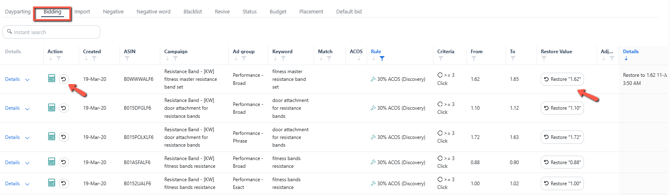
1. Automation: Added Revert Bid action on the Bidding Rule Change Log
Navigation path: Automation > Bidding rule
You now have the option to undo a bidding rule action applied to a specific keyword.
Click the "Restore" button in the bidding rule change log to apply.
This function will revert the keyword to its previous bid or state, with the specific changes shown in the "Details" column on the same page.
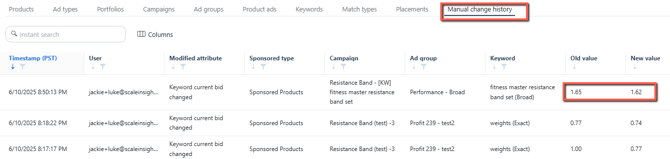
Additionally, this action will be recorded in the Manual Change History tab on the Ads Insights Performance page.
2. Automation: Added SQP data as a Bidding Rule condition
Navigation: Automation > Bidding rule
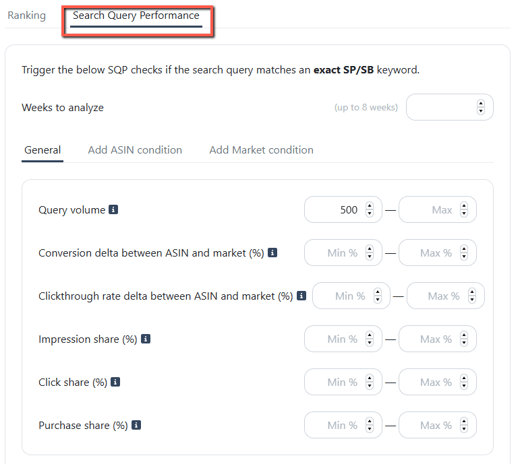
You can now configure Bidding rules using the keyword's Search Query Performance (SQP) data as a condition, allowing for more precise bid adjustments.
You can define general conditions such as query volume and impression share (%). Additionally, you can set specific criteria based on ASIN and marketplace for more precise targeting.
The SQP analysis period can be set for a maximum of 8 weeks.
❗Note:
The SQP checks will only be triggered if the search query matches an exact-match Sponsored Product or Sponsored Brand keyword.
3. Ads Insights: Enabled Manual Search Terms Negation at Campaign Level
Navigation: Ads Insights > Search Terms > Search Terms tab
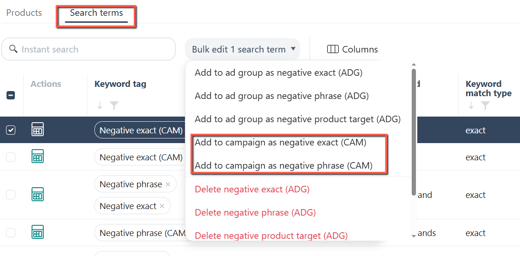
We've introduced a new bulk option that allows you to add negative search terms at the campaign level.
This feature makes it easier to apply the same negation across multiple ad groups within a campaign.
Campaign-level negative search terms will be marked with the "CAM" label in their keyword tag for easy identification.
4. Automation: Enabled adding Product Targets to the Blacklist
Navigation path: Automation > Blacklist
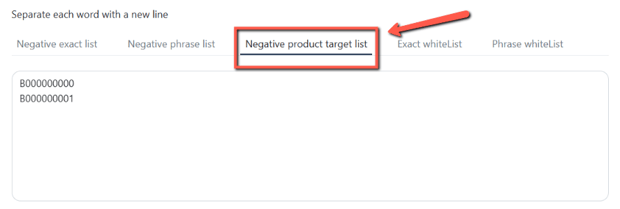
You can now add ASINs to your product's Blacklist.
Once added, they will automatically be applied as negative product targets to the assigned ad groups, helping you better control targeting and ad spend.
Enhancements
1. Keyword Ranking: Added a Summary row under "SQP Details"
Navigation path: Keyword ranking
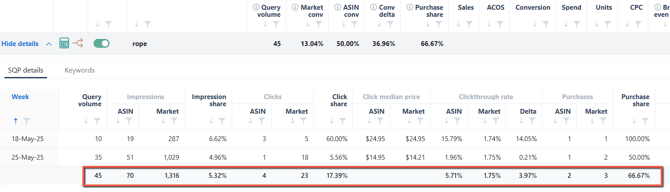
The SQP table now includes a summary row that gives an overview of total data across the analysis period, helping you make faster, data-driven decisions.
Additionally, the data is now displayed in a structured table format, making monitoring and analyzing weekly trends easier.
2. Main dashboard: Hide the Account-level fee when a product is selected
Navigation path: Sales > Regional sales
Selecting a specific product from the dropdown on the main dashboard now displays profit figures that exclude account-level fees, more accurately reflecting that product's performance.
The account-level fee tab is automatically hidden when a product is selected to keep the data view streamlined and relevant.
.png?width=520&height=336&name=Scale+Insights+Account+level(3).png)
3. Ads Insights: Included Manual Bid Change history on the Keyword Trend table
Navigation path: Ads Insights > Performance > Keyword tab
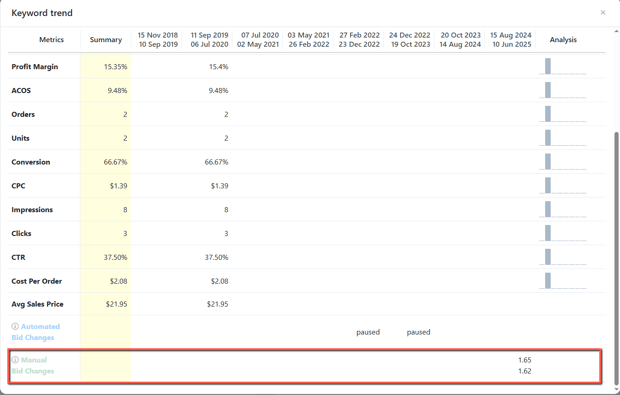
Previously, the Keyword Sales Trend only reflected bid changes made through automation.
It now captures manual bid adjustments made from the Ads Insights Keyword Performance page.
With this expanded historical data, you can now review automated and manual changes, helping you refine your strategies based on performance.
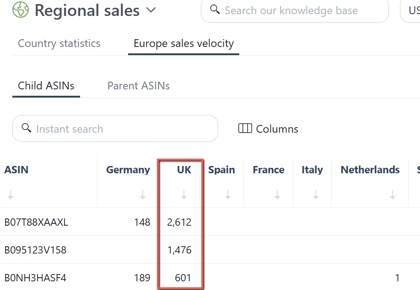
4. Regional Sales: Added the UK marketplace data in the Europe Sales Velocity page
Navigation path: Sales > Regional sales
You can now access detailed summaries of sales performance and profits for the UK marketplace.
Go to the Europe Sales Velocity section of the Regional Sales page for valuable insights into market-specific sales performance.
5. Automation: Enhanced the Criteria Profile data input message
Navigation path: Automation
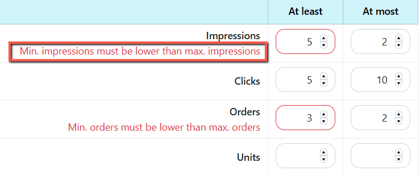
We've made it easier to create a criteria profile by displaying error messages directly beside the input field with the issue.
This enhancement makes it easier to spot and correct issues immediately, streamlining the setup process.
Bug Fixes
Automation: Fixed Issue with "Add" button on Negative Rule page
-
We've resolved the issue where clicking the "Add" button on the Negative Rule page would remove the currently assigned rule.
-
With the patch now in place, you can add additional negative rules to the ad group without affecting existing ones.