
Enhancements
1. UI/UX Enhancement to the Automation Module
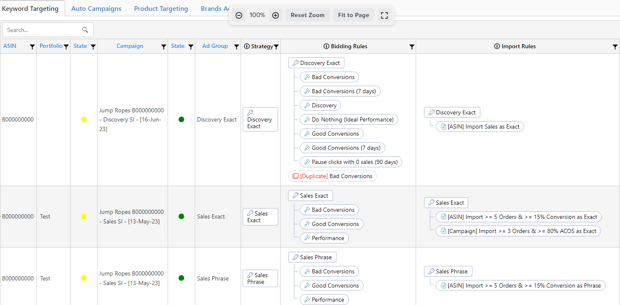
You can now see more precise relationship assignments of strategic objectives/rules + custom rules.
You can also directly edit the strategic objective or rules by clicking on them.
Changes are reflected in different pages in the automation module, such as the "Assigned rules" and "Strategic Objectives" pages.
2. Tooltip: Strategic Objectives and Rules
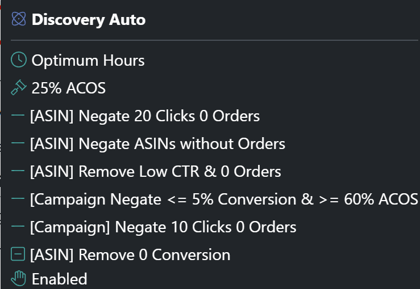
A tooltip has been included to provide pertinent information about Strategic Objectives and Rules.
If you hover over the Strategic Objective, a list of assigned rules for that objective will appear.
If you hover over the rules, you will see the triggering criteria, conditions, priority number, etc.
Sample of Strategic Objective:
3. Strategic Objective: Prioritized Assigned Rules in Descending Order
The rules under the strategic objective have been prioritized in descending order to understand the execution sequence better.
This change will help you visualize the automation workflow and plan accordingly.
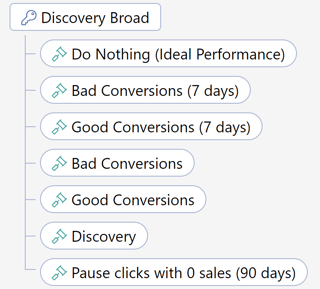
In the given example, the bidding rule named "Do Nothing (Ideal Performance)" has a priority number of "110". It is followed by the bidding rules named "Bad Conversions (7 days)" and "Good Conversions (7 days)" with a priority number of "15". The last rule is the "Paused clicks with 0 Sales (90 days)" bidding rule, which has a priority number of "-1".
4. Added TOS Impression Share column on the Keywords Performance page
Navigation path: Ads Insights > Performance > Keywords tab
This feature allows users to check keywords TOS impression share as a reference for keyword bid adjustment and ranking.
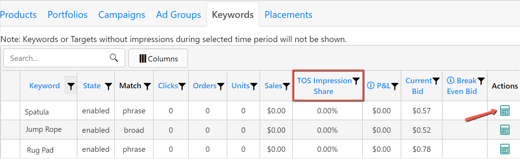
When you click on the calculator icon, the keyword PPC trend also includes a row for TOS impression share.
❗Note
The availability of TOS-IS data is limited to recent stats, as SI has just started collecting this information. Older stats may not be accessible.
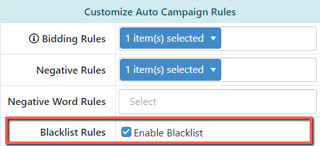
5. Automation: Blacklist Rule checkbox selector in the Strategic Objective edit page
Previously, many options on the dropdown list needed to be clarified when choosing the status of the Blacklist rule of Auto Campaign Strategic Objective.
Now, you can enable the blacklist rules by clicking the check box.
6. Unified view and behavior of Criteria Profile, Rules, and Strategic Objective
All the Criteria, Rules, and Strategic Objectives in every table and pop-up across all pages of the SI platform now have the same appearance and behavior, both on hover and on click.
Other Improvements
1. Dashboard: Connect to Amazon
-
We fixed the issue where the "Disconnect" button for the Ads account in the UK marketplace does not correctly delete the EUAdsRefreshToken on the Tenant database causing an error reconnecting the Ads account.
2. Cloning of the Keyword Targeting Objective
-
Previously, the "Assign Priority" number and the "Enabled" status of the Blacklist rule were not copied when cloning the Keyword Targeting Objective.
-
The cloned objective now includes the "Assign Priority" number and the "Enabled" status of the Blacklist rule.
3. Column Filters on Different Algorithm Pages
-
Change from Conditional Filter to Search Filter on the Import, Negative, and Negative Word rule page.
| Search Terms Source [Custom Group] > Custom Groups by Products tab > Title column |
| Search Terms Source [Custom Group] > Custom Groups by Products > Action (Edit) > Campaign & Ad Group columns |
- Change from Conditional Filter to Search Filter on the Status rule page.
| Status Rules > New Campaign Status & New Ad Group Status columns |
-
Change from Search Filter to Numeric Conditional Filter
| Automation > Automate Assignment > Active Ad Groups & Objectives Assigned column |
4. Download CSV File: Character Change on MX Marketplace
-
We fixed an issue where there were character changes upon downloading the CSV file on the MX marketplace.
-
The change is reflected on the below pages:
| Ads Insights > Performance | |
| Ads Insights > Search Terms | |
| Ads Insights > Best Metrics | |
| Ads Insights > Competing Keywords | |
| Ads Insights > Main Keywords | |
| Ads Insights > Dead Keywords | |
|
Pages with Bulk Operations Download Template
|
Products > Bulk Operations tab |
|
Automation > Strategic Objective > Keyword Targeting |
|
|
Automation > Strategic Objective > Auto Campaign |
|
|
Automation > Strategic Objective > Product Targeting |
|
|
Automation > Strategic Objective > Video Ads |
|
|
Automation > Strategic Objective > Video Product Targets |
|
|
Automation > Strategic Objective > Display Ads |
|
|
Ads Insights > Link Ads with ASINs |
|
|
Automation > Algorithm > Import Rule > Search Term | |