
Scale Insights uses various algorithms to automate parts of your advertising strategy—from adjusting bids and budgets to identifying new targets and reducing wasted spend.
Important
All algorithms run once a day, except Dayparting Rules, which run hourly based on your configured schedule. Daily Budget Rules run at the start of the marketplace’s timezone.
Navigation: Automation → Algorithms
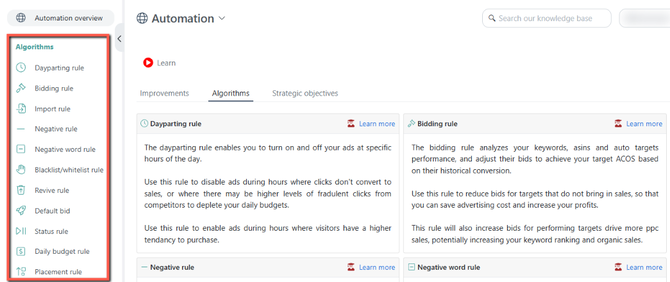
Use an algorithm based on what you want to automate.
| If you want to... | Use this algorithm |
|---|---|
| Adjust keyword bid and status based on performance | Bidding |
| Adjust keyword bid and ad status based on the hour of the day | Dayparting |
| Find high-performing search terms and add them as targets | Import |
| Block poor-performing search terms | Negative |
| Identify individual words that contribute to poor performance | Negative Word |
| Block specific keywords across your advertising | Blacklist |
|
Protect specific keywords from being negated |
Whitelist |
| Bring previously performing keywords back into traffic | Revive |
| Optimize default bids in legacy Auto Campaigns | Default Bidding |
| Pause/enable campaign and ad group based on performance | Status |
| Adjust campaign daily budgets | Daily Budget |
| Optimize placement adjustments | Placement |
Dayparting Algorithm
Adjust your advertising based on the time of day.
The Dayparting Algorithm lets you pause or enable ad groups and adjust keyword bids during specific hours based on your dayparting strategy.
Use it when:
You want to control when your ads are active or adjust bids during hours when performance is stronger or weaker.
Example:
If your campaigns perform better during the day, you can increase bids during those hours and reduce or pause activity overnight.

Bidding Algorithm
Automatically adjust keyword and product-target bids or keyword status based on performance.
The Bidding Algorithm evaluates historical performance against your rule criteria and can adjust keyword and product-target bids or change keyword status based on the actions you define.
Use it when:
You want to continuously optimize bids based on metrics such as orders, conversion rate, spend, or other performance conditions.
Example:
You can create a rule that increases bids when a keyword is performing well and decreases them when performance falls below your target.

Import Algorithm
Turn high-performing search terms into new keywords or product targets.
The Import Algorithm analyzes search-term performance and identifies terms that meet your criteria. It can then add those terms as Keywords or Product Targets to your existing campaigns.
Use it when:
You want to turn successful search-term discoveries into new targeting opportunities without manually reviewing and adding them.
Example:
A search term consistently generates orders and meets your performance criteria. The Import Algorithm can add it as a new keyword based on your rule.

Negative Algorithm
Automatically block search terms that aren't meeting your performance goals.
The Negative Algorithm evaluates search-term performance and adds qualifying terms as Negative Keywords or Product Targets.
Use it when:
You want to reduce wasted spend by preventing search terms that consistently perform poorly from triggering your ads.
Example:
A search term has spent beyond your acceptable threshold without generating an order. Your rule can automatically add it as a negative target.

Negative Word Algorithm
Find individual words that repeatedly contribute to poor performance.
Unlike the Negative Algorithm, which evaluates the search term as a whole, the Negative Word Algorithm breaks search terms into individual words and analyzes their combined performance.
Use it when:
You want to identify problematic words that appear across multiple search terms.
Example:
Suppose several search terms contain the word "kids", and searches containing that word consistently generate poor results. The Negative Word Algorithm can evaluate the combined performance of that word and add it as a Negative Phrase when it meets your criteria.

Blacklist/Whitelist Algorithm
Blacklist Rules block keywords you don't want your products to target, while Whitelist Rules protect important keywords from being negated by automation.
The Blacklist Algorithm adds predefined keywords as Negative Exact or Negative Phrase targets to prevent them from being targeted.
The Whitelist Algorithm protects predefined keywords from being affected by Negative or Negative Word Rules. These can include important or seed keywords.
Use it when:
You want to consistently block irrelevant keywords or protect important keywords from being negated.
Example:
If a keyword is irrelevant to one of your products, you can add it to the product's blacklist so it can be automatically blocked from your advertising.

Revive Algorithm
Bring historically successful keywords back into traffic.
The Revive Algorithm identifies keywords that are no longer receiving traffic and checks their historical performance. When a keyword qualifies, the algorithm can gradually increase its bid to help regain traffic, up to the limits defined in your rule.
Use it when:
A previously successful keyword has stopped receiving traffic and you want to give it another opportunity without manually monitoring and increasing its bid.
Example:
A keyword previously generated several orders but has stopped receiving impressions. The Revive Algorithm can gradually increase its bid until the keyword starts receiving traffic or reaches your configured bid limit.

Default Bidding Algorithm
Optimize default bids in legacy Auto Campaigns based on performance.
The Default Bidding Algorithm evaluates the performance of ad groups in Auto Campaigns and adjusts their Default Bids according to your configured criteria and target ACOS.
Use it when:
You want to automate bid optimization for Auto Campaigns without manually adjusting default bids.
This rule is primarily used for older Auto Campaigns without targeting clauses, such as Close Match, Loose Match, Substitutes, and Complements.
Example:
If an Auto Campaign is consistently performing above your target ACOS, you can use the algorithm to adjust its default bid based on your rule.

Status Algorithm
Automatically pause or enable ads based on performance.
The Status Algorithm evaluates ad performance against your configured criteria and changes the campaign and/or ad group status when those conditions are met.
Use it when:
You want to automatically stop underperforming ads or reactivate ads when they meet your performance requirements.
Example:
You can create a rule that pauses a campaign after it reaches a specific spend threshold without generating an order.

Daily Budget Algorithm
Adjust campaign budgets based on performance or day of the week.
The Daily Budget Algorithm automatically increases or decreases a campaign's daily budget when your configured conditions are met or the daily adjustment setting.
Use it when:
You want to give more budget to campaigns that are performing well or control spend when performance is weaker.
Example:
If a campaign is generating strong results and reaches your performance criteria, you can increase its daily budget to give it more room to spend.

Placement Algorithm
Optimize placement bid adjustments based on performance.
The Placement Algorithm adjusts your campaign's Top of Search %, Rest of Search %, and Product Page % based on the performance of those placements.
Use it when:
You want to automatically increase or decrease placement adjustments based on how each placement performs.
Example:
If Top of Search consistently performs better than Product Page, you can configure a rule to adjust the Top of Search placement based on your performance criteria.

For more information about the available algorithms for each Sponsored Ad type, see Available Algorithms for Ads