
You've connected your account, prepared your product information, and either set up your campaigns or assigned your first automation rules. Now it's time to monitor activity, understand performance, and identify opportunities to improve.
You don't need to check every module every day. Start with your active rules and automation activity, then expand your review as you become more familiar with the platform.
[drawer]1. Your First Few Days: Confirm Automation Is Running
After assigning rules, confirm that your setup is working as expected.
Check your active rules
Navigation: Automation > Assigned Rules
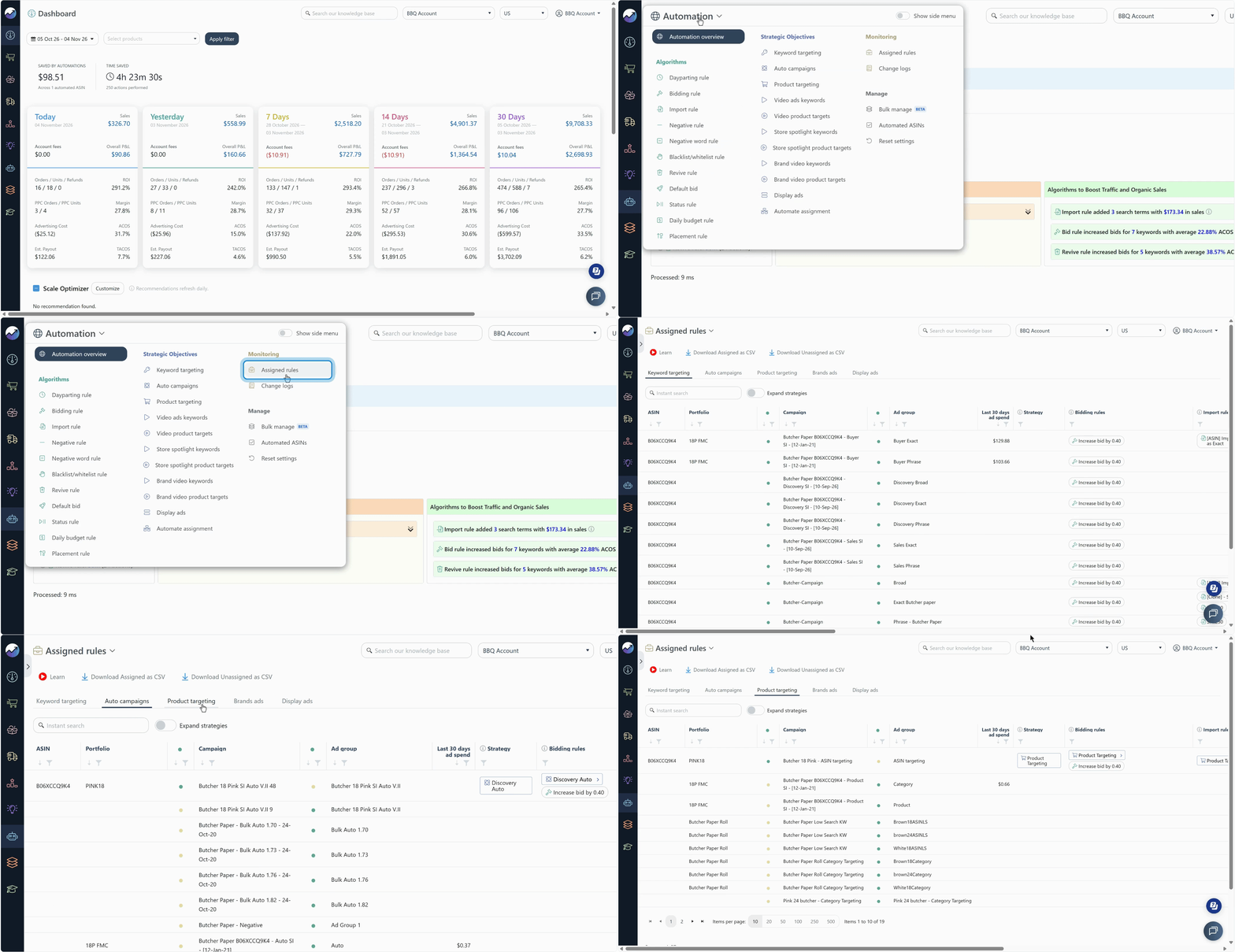
Review which rules are assigned to your campaigns and ads. Make sure the selected rules align with your optimization goals and that you haven't accidentally included ads you didn't intend to automate.
Guide: How to Check Active Rules
Review Automation Previews
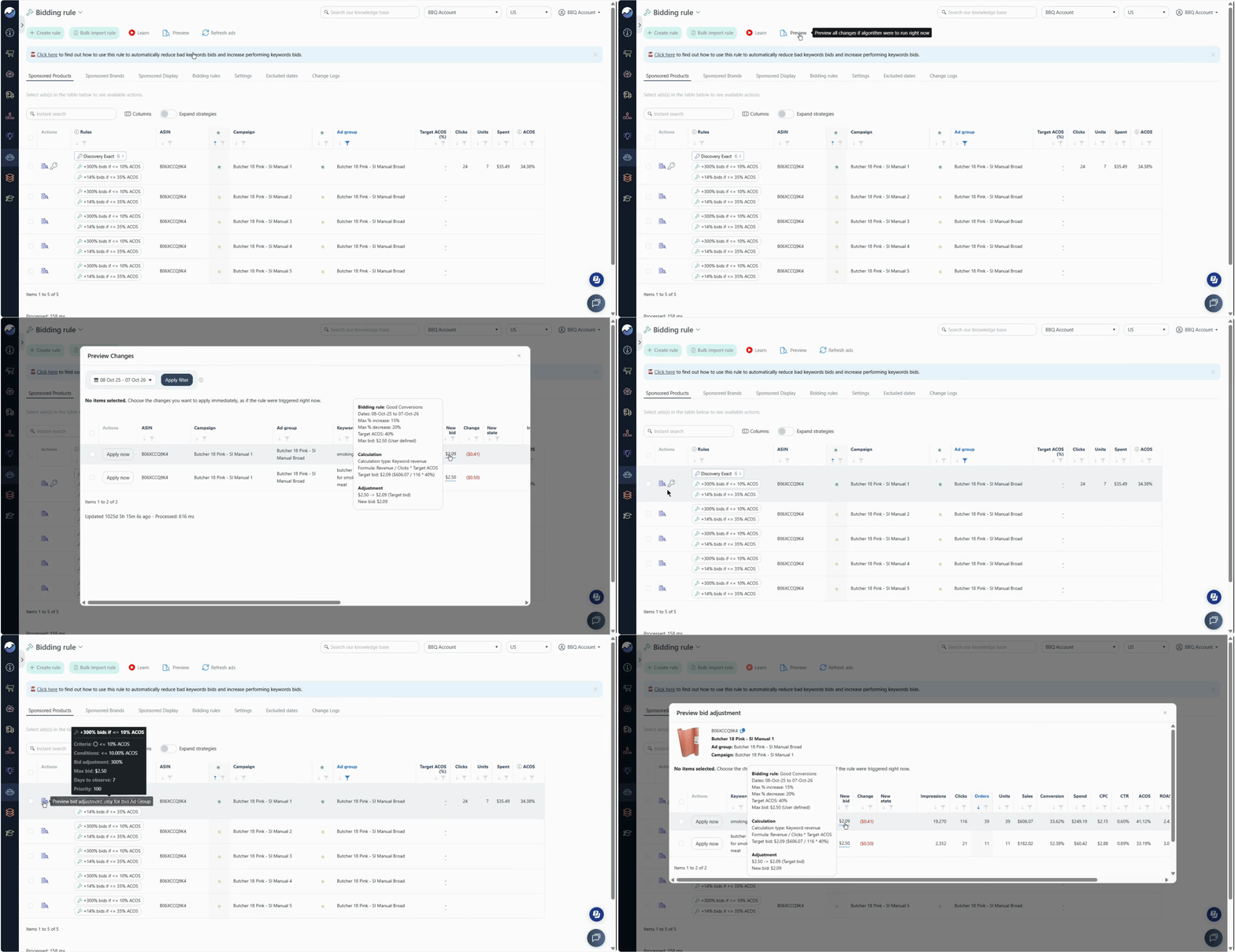
A Preview shows the proposed changes generated by the rule based on the configured conditions and available performance data. It helps you verify that your automation is identifying the right opportunities and generating actions that align with your intended strategy.
What you can do with a Preview:
- Review proposed changes: Check which search terms, keywords, or ads are affected and what changes the rule is proposing.
- Verify rule behavior: Confirm that the proposed actions match your optimization goals.
- Fine-tune your settings: If the proposed changes look unexpected, adjust the rule conditions, actions, or assigned ads before the next scheduled rule execution.
- Apply changes before scheduled execution: Apply the proposed changes immediately instead of waiting for the rule's next scheduled execution. This lets you implement optimizations sooner.
A Preview becomes available when an assigned rule's criteria are met based on your advertising performance data. Depending on the algorithm, the criteria may be evaluated at the search term, keyword, or ad level.
Guide: Preview Proposed Rule Changes
Review Actions Performed By Rules
Use the Change Logs to review which rules have run and what actions they've taken.
These may include bid adjustments, keyword additions, search term negations, and other supported changes to your advertising campaigns.
Navigation: Automation > Change Logs
Follow this walkthrough to see how to review and interpret Bidding Rule actions in the Change Log:
Keep in mind:
- The Change Logs show actions that have been carried out by automation rules.
- If a rule's criteria aren't met, or no changes are made, there may be no corresponding action recorded.
- You can revert certain actions, including changes made by Bidding and Import rules, where the revert option is available.
Guide: Reviewing Automation Actions Taken
[drawer]2. Your First Week: Review Performance and Look for Opportunities
Once you have verified that your rules are assigned correctly, start reviewing performance in context.
Monitor your core metrics
Use your dashboard and available reporting views to review metrics such as:
- ACOS: Advertising spend as a percentage of advertising sales.
- TACOS: Advertising spend as a percentage of total sales.
- Sales: How much revenue your product is generating.
- Profitability or margin: How your sales perform after accounting for relevant costs.
Looking at these metrics together provides a more complete picture than judging performance using ACOS alone. For example, a change in advertising efficiency may need to be evaluated alongside sales volume and overall business performance.
Where available, use the dashboard's last-30-days view to understand broader trends rather than overreacting to a single day's results.
Explore Ads Insights
Use Ads Insights to investigate your advertising performance at both granular and aggregated levels. Review search term and keyword data, analyze profitability, and identify opportunities to improve campaign performance.
Here are some ways to make the most of this module:
- Analyze search term performance: Identify converting search terms, spot non-converting terms, and find opportunities for keyword harvesting or negation.
- Evaluate keyword performance: Review impressions, clicks, spend, orders, sales, ACOS, and other metrics to identify keywords that need bid adjustments or further optimization.
- Review your Profit and Loss (P&L): Understand how advertising costs affect your overall profitability and identify areas where you may be spending more than necessary.
- Expand individual records: Open detailed records to explore additional performance data and gain deeper insights into specific search terms, keywords, campaigns, and ad groups.
- Use column filters: Refine your analysis by filtering specific metrics, performance conditions, or targets. Focus on the search terms, keywords, or campaigns that need attention.
Use these insights to make informed decisions about which keywords to harvest, negate, adjust, or continue investing in.
Learn more: Ads Insights
Review sales and keyword performance
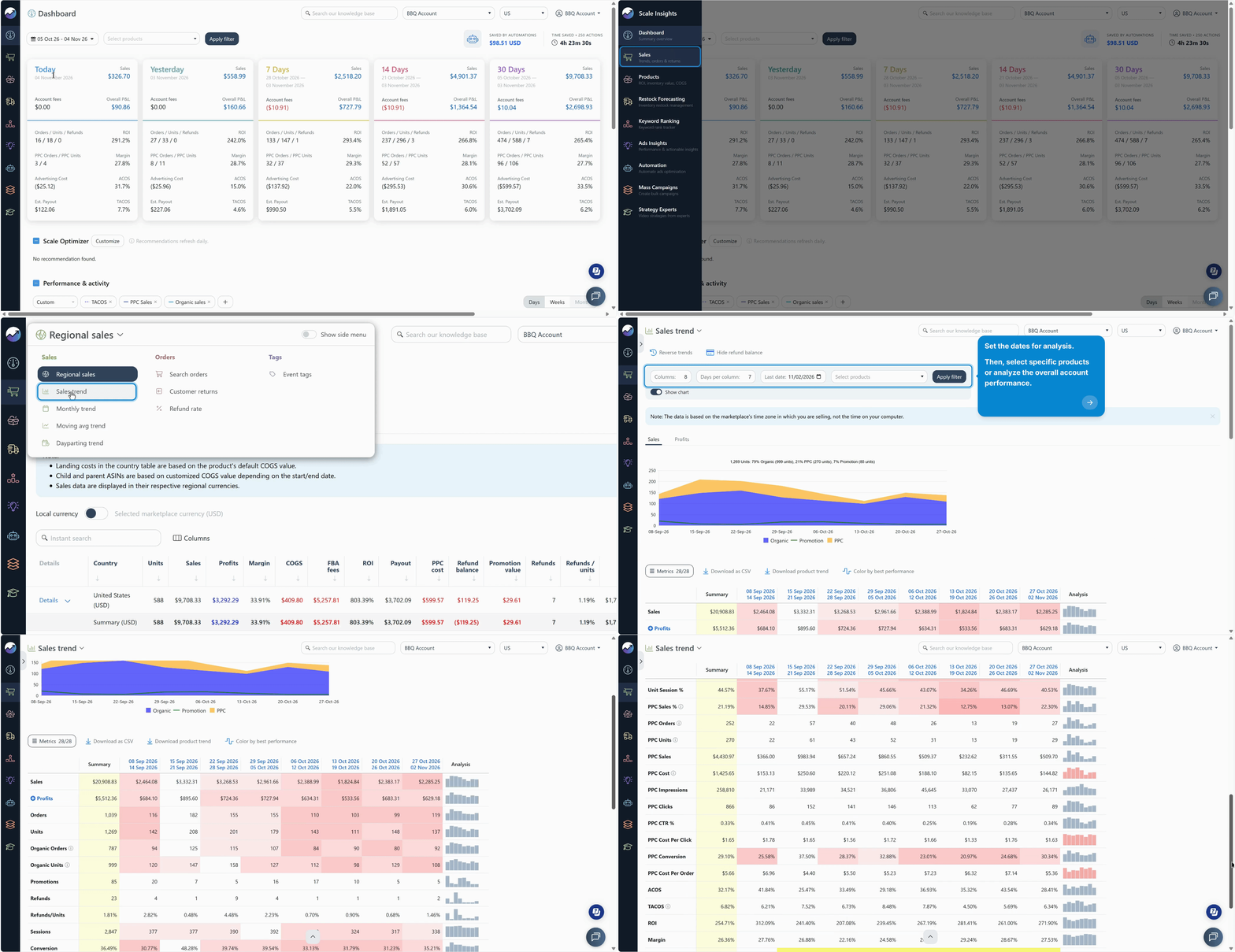
Use the Sales module to monitor your overall business performance across marketplaces. Review sales trends, units sold, profits, margins, and other key metrics to understand how your business is performing over time.
Compare performance across different periods and marketplaces to identify trends, evaluate profitability, and spot opportunities for improvement.
Learn more: Sales
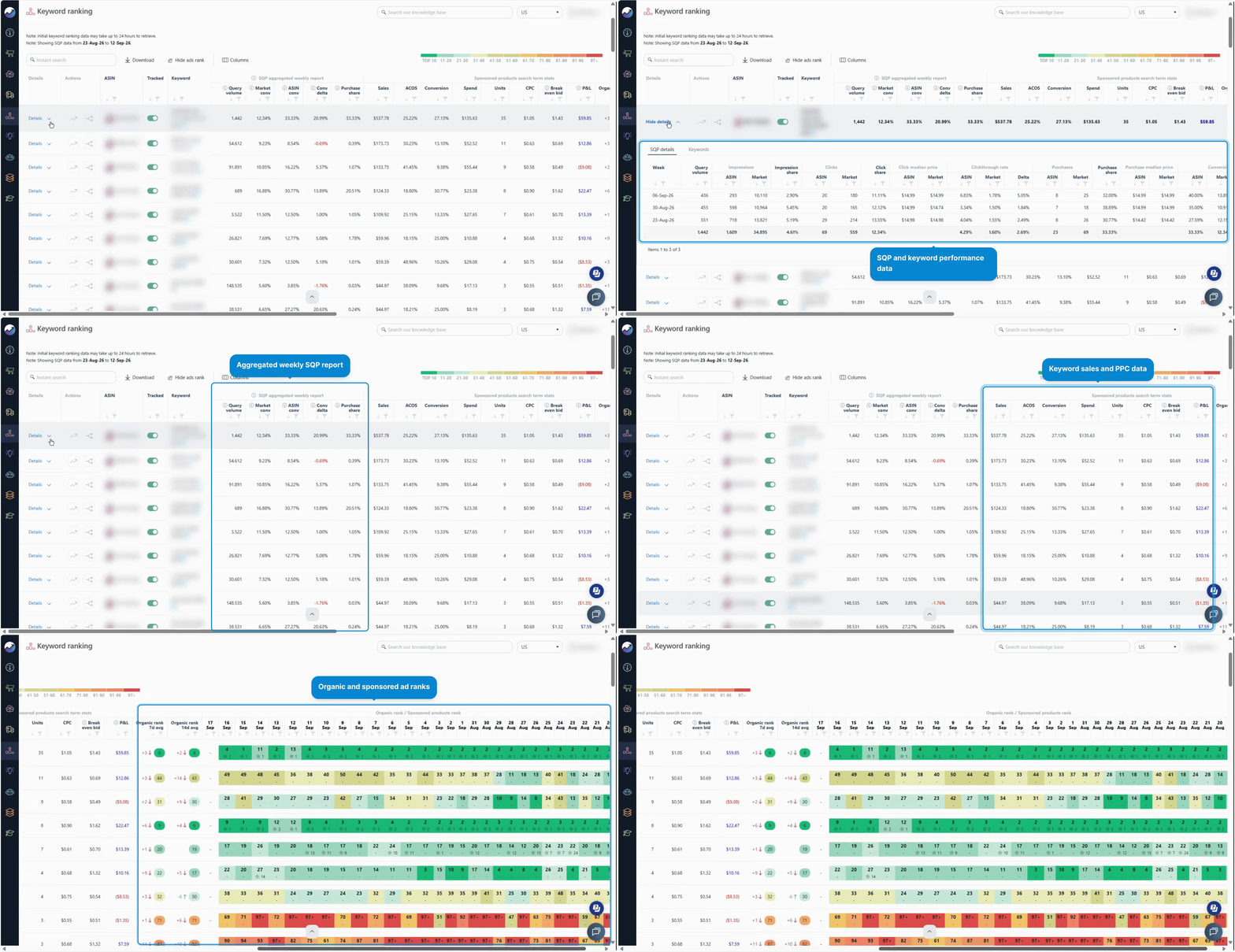
Use Keyword Ranking to track how your products perform in Amazon search results. Monitor both organic and sponsored ad rankings to understand your product's visibility for specific keywords.
You can also review keyword-level SQP and PPC data to identify ranking trends, evaluate keyword performance, and discover opportunities to improve search visibility.
Learn more: How Keyword Ranking Works
[drawer]3. Your Second Week: Refine Your Strategy
Once you're comfortable with the basics, explore additional tools that can help you fine-tune advertising and support longer-term growth.
Review your Bidding Rules
As you gain experience, revisit your rules to make sure their conditions and actions still match your goals.
Depending on your Bidding strategy, you may want to adjust bids based on Target ACOS, increase or decrease bids by a fixed amount or percentage, or pause or enable keyword bids.
Review your rule settings and assignment scope before making changes.
Learn more about the Bidding rule: What is the Bidding Rule?
Consider Dayparting for hourly ad adjustments
Dayparting helps you manage advertising activity by hour of the day. Use Ad Scheduling to control when your ads run and Hourly Keyword Bid Adjustments to adjust bids for each hour based on performance.
Evaluate whether time-based adjustments make sense for your product and available performance data before introducing them into your strategy.
Learn more about the Dayparting rule: What is the Dayparting Rule?
Apply other Algorithms to optimize your ads
Explore the available automation algorithms to find additional ways to improve your advertising performance.
Each algorithm serves a different purpose, allowing you to address specific optimization needs based on your campaign data and advertising goals.
Here are some ways to use them:
- Optimize keyword bids: Adjust bids based on performance, conversion trends, and your Target ACOS.
- Manage search terms: Identify irrelevant or non-converting search terms to negate and discover high-performing terms to harvest as keywords.
- Control advertising spend: Manage campaign budgets and allocate spend more effectively.
- Optimize ad placements: Adjust placement bid modifiers based on performance to improve advertising efficiency.
- Schedule advertising activity: Use Dayparting to manage ad scheduling and hourly keyword bid adjustments based on performance.
Explore the available algorithms and learn how each one works: Available Algorithms for Ads
Explore Scale Optimizer
Use Scale Optimizer to explore additional optimization opportunities as your campaigns mature.
It provides recommendations to help you identify areas that may need attention and uncover potential ways to optimize your campaigns.
Make it part of your regular optimization routine:
- Review optimization recommendations: Check the suggestions provided by Scale Optimizer to identify potential improvements across your campaigns.
- Identify opportunities: Look for areas where you can improve campaign efficiency, reduce wasted spend, or capture additional sales.
- Evaluate suggested changes: Review each recommendation in the context of your product economics, campaign performance, and advertising goals before applying changes.
Learn how the Scale Optimizer works: Scale Optimizer
Plan inventory with Restock Forecasting
Advertising performance is only one part of growing your business. Maintaining sufficient inventory is equally important to avoid stockouts, protect sales momentum, and support continued growth.
Use Restock Forecasting to monitor inventory levels, estimate future stock requirements, and plan replenishment based on your sales trends and inventory timelines.
Here are some ways to make the most of this module:
- Monitor and forecast inventory: Review available stock and use sales velocity to estimate when your products may need replenishment.
- Set production and lead times: Enter how long it takes to prepare your products and receive new inventory to help improve forecast accuracy.
- Plan replenishment ahead: Use restock estimates to determine when to place orders and avoid last-minute inventory shortages.
- Receive restock notifications: Once a Restock Forecasting profile is assigned to your product, receive email notifications to help you anticipate replenishment needs and plan ahead.
Keep your inventory details and timelines up to date to get more reliable forecasts.
Learn more: How Does Forecasting Work?
[drawer]4. What Should You Expect from Automation?
Scale Insights follows the rules and settings you assign. It doesn't automatically know your preferred strategy unless you configure the conditions, actions, and targets that reflect your goals.
What to Expect as Your Automation Takes Effect
Results may take time. Bid adjustments and performance changes may happen gradually. Don't expect a dramatic improvement immediately after assigning your first rule.
Look at trends, not just individual days. Amazon needs time to attribute sales and send updated data to Scale Insights, so the most recent 2–5 days may be incomplete. For more reliable analysis of automation rules, consider excluding these days and customizing the evaluation period in your rule settings.
Learn more in Understanding Data Attribution and Reporting Delays.
Your rules determine the actions taken. If the outcome doesn't match your expectations, review the assigned rules, their conditions, the actions they perform, and the targets you've configured.
Product economics matter. Your COGS and other product information influence profitability calculations and should be kept up to date.
Tip: Give your setup time to collect meaningful data, but continue checking that automation is operating as intended.
Troubleshooting and Improving Your Automation
Automation rules may sometimes behave differently than expected due to rule conditions, performance data, or configuration settings.
Review our Troubleshooting Common Automation Issues guide for practical steps to resolve common issues, including unexpected bid changes, rules that haven't executed, search terms that aren't being negated, and keywords that aren't being harvested.
[drawer]5. Your Ongoing Review Checklist
Use this checklist to establish a simple routine.
Daily or whenever you review your account
- Check active rules and confirm that assignments are correct.
- Review recent automation actions and bid changes.
- Investigate any unexpected changes or issues.
During your regular performance review
- Review ACOS, TACOS, sales, and profitability or margin together.
- Check Ads Insights for opportunities to improve performance.
- Review keyword rankings and sales trends.
- Revisit rule conditions and targets when your strategy or product economics change.
- Check inventory forecasts and replenishment needs when relevant.
You don't need to make changes every time you review the data. Sometimes the most useful action is confirming that your rules are behaving as intended and allowing them to continue working.
[drawer]6. Understand the Value of Automation
Automation can reduce repetitive manual bid management and help you apply your strategy more consistently.
To evaluate its impact, review the time and advertising dollars saved alongside campaign performance.
Guide: Measuring Time and Advertising Dollars Saved
Remember that automation is a tool for executing your strategy. The quality of your product data, rule configuration, and ongoing review all contribute to how effectively it supports your goals.
Where to Go Next
As you become more comfortable with Scale Insights, use this module to learn more workflows to scale your ads: Strategy Experts
Learn how Scale Insights retrieves Amazon data and factors that affect data accuracy: Understanding Data Attribution and Reporting Delays.
Your goal isn't to use every feature at once. Start with a reliable foundation, understand what your automation is doing, and add tools as your business needs evolve.
Analyze and Optimize with Scale Insights MCP
Use Scale Insights MCP to analyze advertising performance, identify optimization opportunities, and interact with your Scale Insights data using AI. You can also use it to review automation rules and execute supported rule actions, helping you make informed decisions and manage your PPC strategy more efficiently.
Explore the Scale Insights MCP Guide to learn how to get started.