
Welcome to Scale Insights!👋
This guide will help you connect your Amazon Seller Central account, prepare your product information, and get familiar with the tools available to manage and grow your Amazon PPC campaigns.
[drawer]1. Connect Your Amazon Account
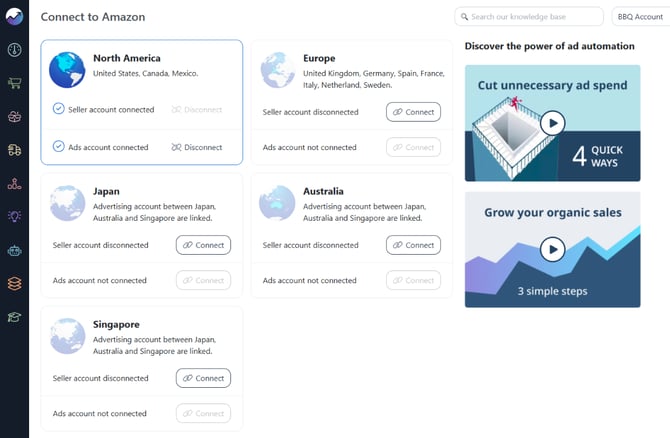
Scale Insights connects to your Amazon Seller Central account to retrieve sales and advertising data, helping you monitor performance and automate campaign optimization.
Before you connect
If you aren't the primary owner of your Seller Central account, ask the account owner to grant the required Global Permissions to Manage Authorized Partners before connecting.
Connect your account
Follow the instructions in our Amazon account connection guide to connect your account.
What data does Scale Insights retrieve?
After connecting your account, Scale Insights retrieves available sales and advertising data, including 60 days of historical data, to support performance reporting, campaign analysis, and automation.
How long is my data retained?
Only the latest 19 months of data remain available for direct querying in your Scale Insights account. The Historical Data Archive lets you access non-SP-API data older than 19 months through a historical download.
For more details, see How Long Will Scale Insights Retain My Data?
[drawer]2. Set Up Your Product Information
Add your product details to help Scale Insights optimize your advertising and manage inventory more effectively.
Follow this walkthrough to assign product short names, update COGS, and configure production and freight lead times in Scale Insights.
Set Your COGS
Enter your Cost of Goods Sold (COGS) to help Scale Insights calculate profitable bids and guide optimization decisions. Accurate COGS allows SI to account for your product costs when calculating break-even bids and evaluating profitability.
Set Your Production and Freight Lead Time
Enter your production lead time (how long it takes to manufacture or prepare your products) and freight lead time (how long it takes for inventory to arrive after an order is placed).
These details are essential for Restock Forecasting. Once restock forecasting is enabled, Scale Insights uses your inventory information and timing settings to estimate when you need to replenish your stock. You'll also receive email notifications to help you plan ahead and reduce the risk of running out of inventory.
Assign a Short Name to Your Products
You can assign a Short Name to each product to make it easier to identify products throughout Scale Insights. When a Short Name is entered, some pages will display it instead of the full product title.
Short Names make products easier to identify, especially when titles are long or similar, helping you navigate product pages and review performance or automation rules more efficiently.
You can update your product information individually or in bulk. Check these guides:
Tip: Keep your COGS and inventory timelines up to date to support more informed optimization decisions and accurate restock forecasts.
Selling in the UK or EU?
Review How to Enable VAT Calculation to account for VAT where applicable.
[drawer]3. Explore Scale Insights Features
Scale Insights includes several tools to help you manage advertising, evaluate business performance, and plan growth. You don't need to master every module before getting started. Begin with Automation, then explore other tools as your needs evolve.

Automation
Automate ad optimization
Automate your PPC management with rules that optimize bids, manage keywords, control budgets, adjust placements, and streamline campaign activities based on your advertising strategy.
Learn more: Overview of the Automation Engine
 Mass Campaigns
Create bulk campaigns
Create campaigns in bulk to support your campaign setup and scaling strategy. Use Fully Managed Campaigns to build campaigns around the Scaling Blueprint.
 Ads Insights
Performance & actionable insights
Analyze advertising data to understand campaign performance, identify trends, and uncover opportunities to optimize your PPC strategy.
Learn more: Ads Insights
 Keyword Ranking
Keyword rank tracker
Track keyword rankings and monitor your products' organic visibility.
Learn more: How Keyword Ranking Works
 Sales
Trends, orders and returns
Review sales performance to understand how your business is doing beyond individual advertising metrics.
Learn more: Sales
 Products
ROI, inventory values, COGS
View and manage your product information, including product details, COGS, production and freight lead time.
Learn more: Products

Restock Forecasting
Inventory restock management
Use forecasting tools to help plan inventory replenishment and avoid overlooking upcoming stock needs.
Learn more: How Does Forecasting Work?
 Strategy Experts
Video strategies from experts
Access educational content, videos, and practical guidance from advertising experts to help you improve your Amazon PPC strategy and make better use of Scale Insights.
Explore: Strategy Experts.
[drawer]4. Understand the Key Automation Terms
These terms will help you understand how Scale Insights organizes and applies your optimization strategy.
Criteria Profile
A Criteria Profile defines the criteria used to evaluate advertising performance and determine when an automation rule is triggered based on the configured conditions.
Search Term Source
A search term source defines where the rule retrieves search terms from, such as at the product, campaign, or ad group level, to determine which search terms to evaluate for negation or import. This setting is used by Negative, Negative Word, and Import rules.
Rule
A rule defines a condition and the action to take when that condition is met. For example, a rule might lower a keyword bid when its ACOS is above your target.
Algorithm
An algorithm groups and applies rules to guide a particular optimization task, such as a Bidding or Negative algorithm.
Strategic Objective
A Strategic Objective groups different algorithms and rules to support a broader advertising goal. It helps organize how your optimization strategy is applied.
Learn more about Automation in: Overview of the Automation Engine
Scaling Blueprint
The Scaling Blueprint is a campaign growth framework built around four stages: Auto → Discovery → Sales → Ranking. Each stage supports a different part of the process, from gathering data to growing sales and improving keyword rankings.
You'll learn how to apply the Scaling Blueprint in Set Up Your Campaigns and Start Automating.
What Should You Do Next?
Once your Amazon account is connected and your product information is ready, choose the path that fits your current setup:
- Already have active campaigns? You can start assigning automation rules to existing campaigns without rebuilding them.
- Launching a new product or campaigns? Follow the Scaling Blueprint to organize your campaigns and build a foundation for growth.
Continue to Set Up Your Campaigns and Start Automating to get started.