
After setting up Hourly Bid Adjustments, it's important to understand when adjustments are cleared, when they do not apply, and how they appear in Ads Insights.
These behaviors can help you understand unexpected bid changes and verify that your Dayparting Rule is working as intended.
What Resets Hourly Bid Adjustments?
Hourly bid adjustments are cleared when the base bid is updated.
The following actions can reset an hourly bid adjustment:
A Bidding Rule Updates the Bid
Bidding rules always calculate using the current base bid, not the hourly-adjusted bid.
When a bidding rule updates a bid, the hourly bid value is cleared and recalculated during the next scheduled hourly update.
Example:
A keyword has a base bid of $1.00 and a +10% hourly adjustment.
Before a bidding rule executes:
- Base bid: $1.00
- Hourly adjusted bid: $1.10
If a bidding rule later increases the bid by 20%, the calculation uses the base bid of $1.00, not the adjusted bid of $1.10.
After the bidding rule runs:
- The new base bid becomes $1.20
- The hourly adjustment is cleared
- Amazon receives a bid of $1.20
Important: Changes to keyword status do not reset hourly bid adjustments. Only actions that update the bid trigger a reset.
The Bid Is Manually Updated in Scale Insights
If you manually update a bid from the Ads Insights Keywords page or through a Bulk Operation, the new value becomes the base bid, and the existing hourly adjustment is cleared.
Example:
If you update the bid to $1.30:
- The new base bid becomes $1.30
- The hourly adjustment is cleared
- Amazon receives a bid of $1.30
The Bid Is Updated in Amazon or Another Tool
If the bid is changed directly in Amazon Ads Console or through another third-party tool, Scale Insights syncs the updated value during the next data refresh.
The synced value becomes the new base bid, and the existing hourly bid adjustment is cleared.
Example:
If the bid is updated to $1.20 in Amazon:
- Scale Insights updates the base bid to $1.20
- The hourly adjustment is cleared
- Amazon receives a bid of $1.20
When Hourly Bid Adjustments Do Not Apply
Hourly bid adjustments are not applied when the relevant advertising entity is paused.
Paused Campaign
- All rules, including the Dayparting rule's hourly bidding, do not run on paused campaigns.
Paused Ad Group
- Hourly bid adjustments are not applied while an ad group is paused.
- Once re-enabled, hourly bid adjustments resume according to the schedule.
Paused Keyword
- Hourly bid adjustments are not applied while a keyword is paused.
- Adjustments resume once the keyword is re-enabled.
Note: If no ad group status changes occur during a scheduled run, only bid adjustments are applied and recorded in the Change Log.
How Hourly Bid Adjustments Appear in Ads Insights
When a keyword has an active hourly bid adjustment, the Ads Insights > Keywords Performance page continues to display the base bid as the current bid.
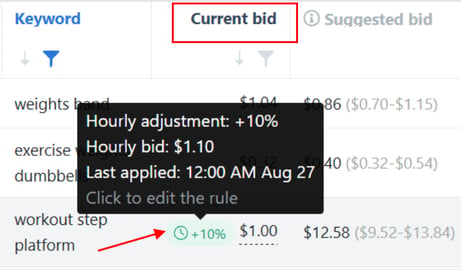
The hourly-adjusted bid is not displayed directly in the bid field. Instead, a chip indicator appears next to the base bid.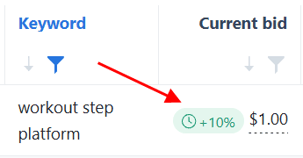
Select the indicator to view:
- The configured hourly bid adjustment percentage
- The calculated hourly bid
- The timestamp of the most recent hourly bid update
You can also click the indicator to open the Dayparting Rule edit page, where you can review or modify the configuration.
Example
If the base bid is $1.00 and the current hourly adjustment is +20%:
- Current bid shown in Ads Insights: $1.00
- Hourly adjustment: +10%
- Calculated hourly bid: $1.10
The indicator provides the additional information needed to understand the active hourly adjustment.
Related Article
Getting Started with Hourly Bid Adjustments
Use this guide if you need help creating or configuring an Hourly Bid Adjustment.