
Days to Observe allows a recent change to take effect before the automation makes another adjustment.
When a rule detects that a relevant change was recently made, it checks the configured observation period. If the change falls within that period, the rule will not make another adjustment yet.
This helps prevent frequent or unnecessary changes while giving the previous adjustment enough time to show its impact.
Why use Days to Observe?
Using an observation period can help you:
- Avoid over-adjusting bids, budgets, or placements too frequently.
- Give changes time to take effect before making another adjustment.
- Prevent conflicting adjustments after manual or automated changes.
- Reduce unnecessary fluctuations caused by reacting too quickly to recent changes.
Use it when you want your automations to make thoughtful adjustments instead of reacting too quickly to recent changes.
How Does the Observation Period Work?
The observation period starts the day after the change is made. The day of execution is not counted as part of the observation period.
For example, if Days to Observe = 3 and a rule makes a change on May 19:
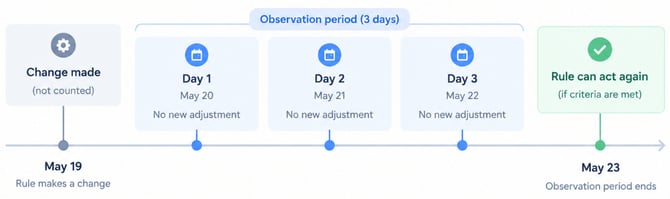
The rule can still evaluate its conditions during the observation period, but it will not apply a new change while the relevant observation period is active.
Think of it as a cooldown: the rule makes a change, then waits for the configured number of days before making another adjustment.
[drawer]How to Configure Days to Observe
To configure the observation period:
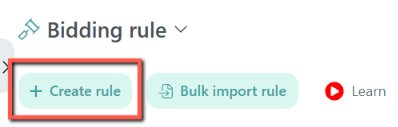
- Go to Automation and open the relevant automation rule.
- Go to the rule creation page or edit an existing rule.
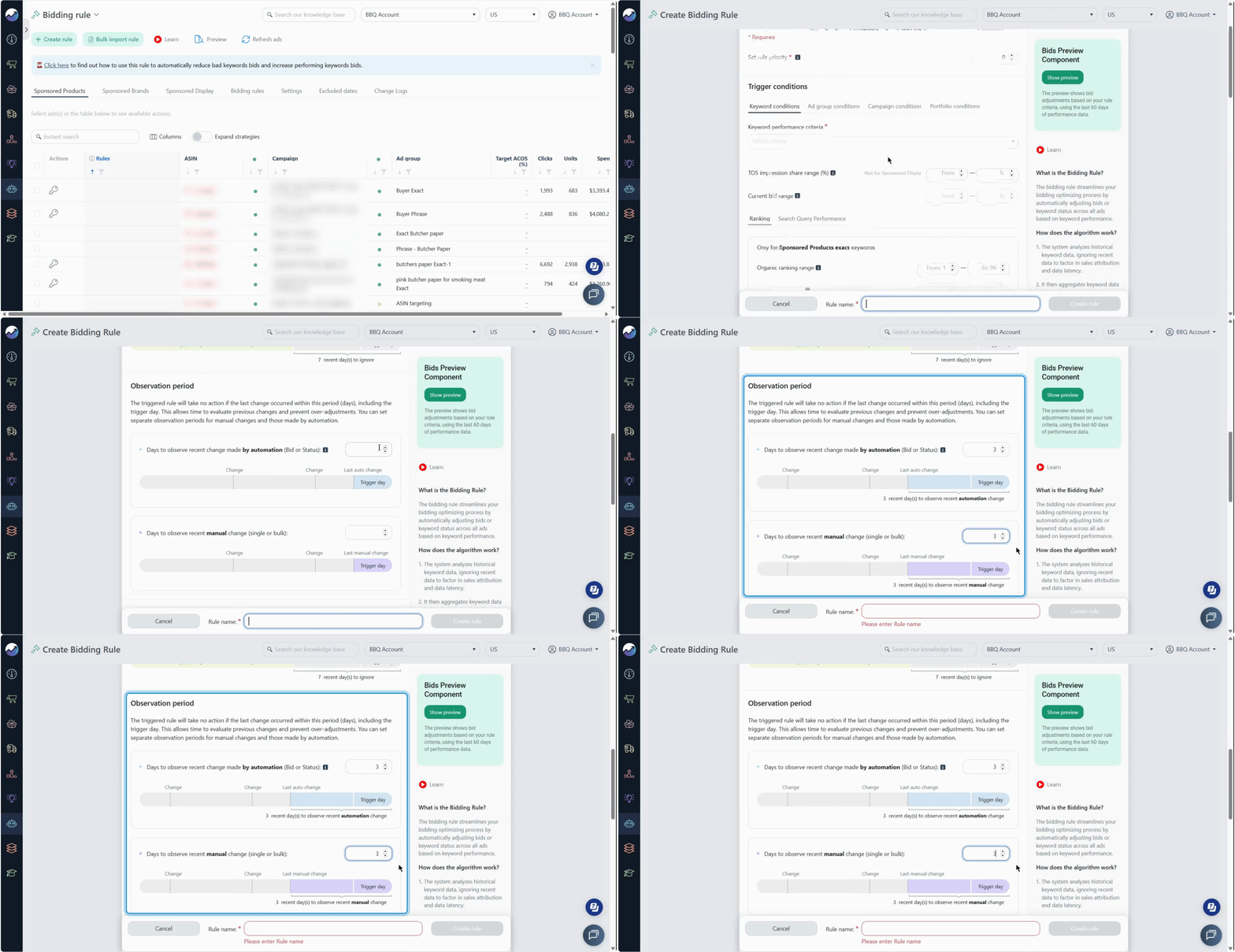
- Find the Days to Observe Recent Changes setting.
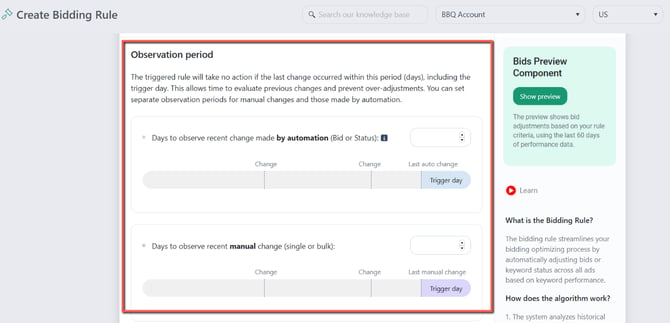
- Enter the number of days you want the rule to wait.
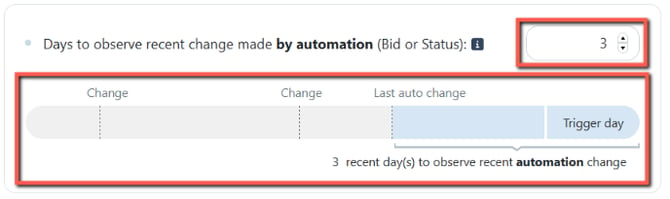
- Configure the remaining rule settings and save the rule.
For Bidding Rules, you can configure separate values for automated changes and manual changes.
[drawer]Which Automation Rules Support Days to Observe?
Days to Observe is available for the following automation rules:
Bidding Rule
You can configure separate observation periods for:
- Recent changes made by automation — applies to automated Bid or Status changes.
- Recent manual changes — applies to manual changes made individually or in bulk in Ads Insights.
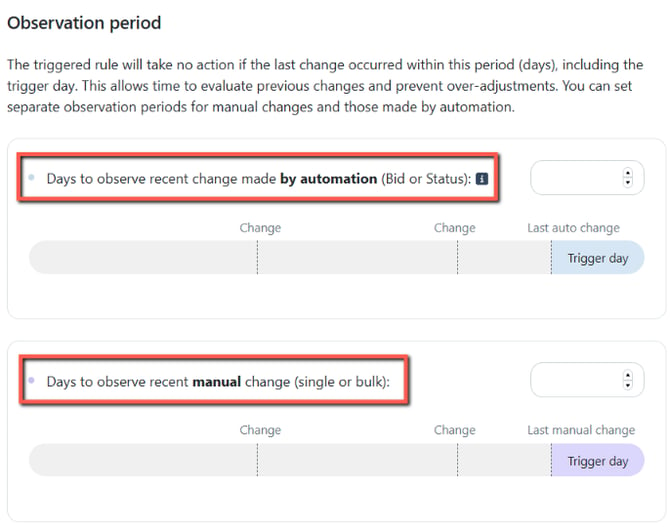
This lets you give manual adjustments or automated changes different amounts of time to take effect.
Budget Rule
The observation period pauses further budget adjustments when a Budget Rule has recently changed a campaign budget.
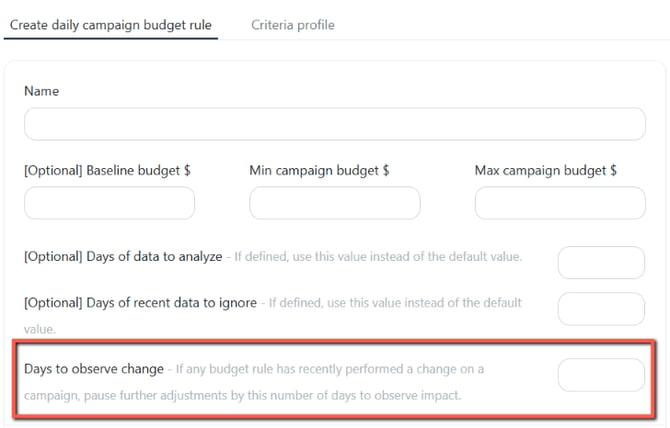
For example, if the observation period is set to 3 days, the automation waits three full days after the budget change before making another adjustment.
Placement Rule
The rule will not execute if Any or The Same Placement Rule has applied a change within the configured observation period, based on the selected option.
Learn how the Placement Rule's Days to Observe works: How the observation setting affects your rules
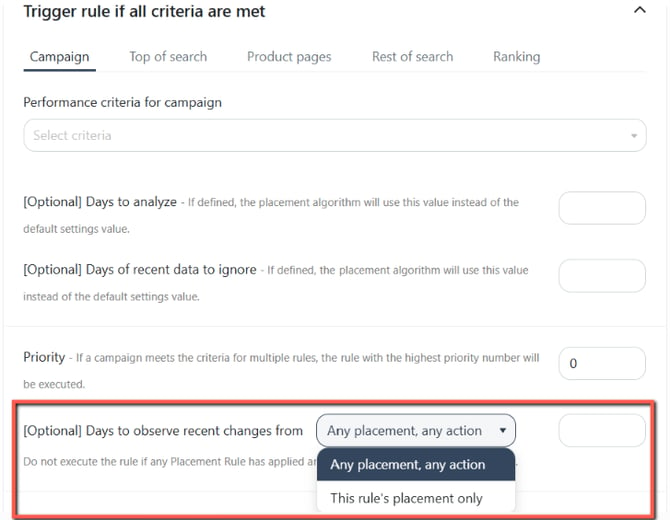
This helps prevent placement adjustments from being made too frequently.
Example: Giving a Manual Bid Change Time to Settle
Suppose you manually increase a keyword's bid in Ads Insights on May 10 and the Bidding Rule is configured with Days to Observe Recent Manual Change = 3.
The observation period starts the following day:
- May 10: You increase the bid manually.
- May 11: Day 1 — automation waits.
- May 12: Day 2 — automation waits.
- May 13: Day 3 — automation waits.
- May 14: The observation period has ended. The Bidding Rule can make a change if its criteria are met.
This prevents the automation from immediately changing a bid you just adjusted manually.
[drawer]How Does This Work With Multiple Rules?
Days to Observe is not a global cooldown across all rules.
When multiple rules can potentially make a change, the observation period that matters is the one configured on the rule that would apply the change, based on its priority and criteria.
For example:
- Bidding Rule A makes a bid change on May 25.
- Bidding Rule B has Days to Observe = 2.
- Bidding Rule C has Days to Observe = 3.
If Rule B is the next rule that can make a bid change, its observation period applies. Since the change happened on May 25:
- Rule B can make a change from May 28 onward.
- Rule C can make a change from May 29 onward if it becomes the applicable rule.
This means a previous rule's Days to Observe setting does not automatically prevent another applicable rule from acting.
What if another rule has no observation period?
If another matching rule becomes the applicable rule and has no Days to Observe configured, it can make a change immediately, provided its other conditions are met.
Similarly, if that rule has a different observation period, its own setting determines when it can make a change.
[drawer]Days to Ignore vs. Days to Observe
These two settings control different parts of how an automation rule works.
| Setting | What it controls | Example |
|---|---|---|
| Days to Ignore | How recent the advertising data can be when the rule analyzes performance | If today is May 5 and Days to Ignore is 2, the rule analyzes data through May 3. |
| Days to Observe | How long the rule waits after a recent change before making another adjustment | If a change is made on May 5 and Days to Observe is 3, the observation period runs from May 6–8. The rule can act again from May 9 if its criteria are met. |
In simple terms:
- Days to Ignore: Which data should the rule analyze?
- Days to Observe: When can the rule make another change?
Learn how Days to Ignore is used to analyze data: How Do Algorithms Analyze Data?
[drawer]Choosing an Observation Period
Choose a period that gives your changes enough time to show meaningful results.
Consider:
- How quickly the metric responds to a change.
- How frequently your campaigns normally change.
- How aggressive you want the automation to be.
- Whether manual changes need additional time before automation takes over.
A shorter period allows the automation to react more frequently, while a longer period gives each change more time to take effect before another adjustment.
[drawer]Things to Keep in Mind
- The day the change is made is not counted as part of the observation period.
- The observation period starts the following day.
- The rule can continue evaluating its conditions during the observation period, but it will not apply the relevant change while the observation period is active.
- Days to Observe is not a global lock across all automation rules.
- When multiple rules can apply, the observation period of the applicable rule determines whether that rule can make the change.
- Bidding Rules can separately observe automated and manual changes.
- Placement Rules can be affected by changes made by any or the same Placement Rule during the observation period.