
Build personalized PPC strategies using AI, based on your product economics, advertising performance, and business goals. With the si-ppc-plan shortcut, you can generate automation recommendations, refine your strategy through conversation, and turn your approved plan into ready-to-import automation rules.
What Is the SI PPC Plan Shortcut?
The si-ppc-plan shortcut is an AI-powered PPC planning tool available through SI MCP. It helps you develop a product-specific advertising strategy without having to manually review and configure multiple automation algorithms and rules.
Instead of relying on generic recommendations, the AI analyzes your product's economics, profit margins, and historical advertising performance to suggest a PPC strategy suited to your business objectives.
You can also discuss and refine the recommendations with the AI before generating an import file containing your automation configurations.
Key Benefits
- Personalized PPC strategies: Get recommendations based on your product's profitability, advertising performance, and business objectives rather than relying on one-size-fits-all criteria.
- Simplified strategy development: Let AI evaluate suitable bidding, keyword harvesting, keyword importing, and negative targeting strategies without manually piecing together individual rules.
- Flexible strategy adjustments: Refine recommendations through natural conversation to align with your preferred ACOS targets, bidding approach, and advertising goals.
- Transparent recommendations: Review the reasoning and supporting evidence behind the proposed strategy before proceeding.
- Faster automation setup: Generate a BulkRuleEditor ZIP file containing your proposed rules and configurations, reducing the manual work involved in setting up automation.
[drawer]How Does It Work?
The PPC planning workflow consists of three stages: AI analysis, strategy refinement, and automation setup.
Step 1: Generate a PPC Plan
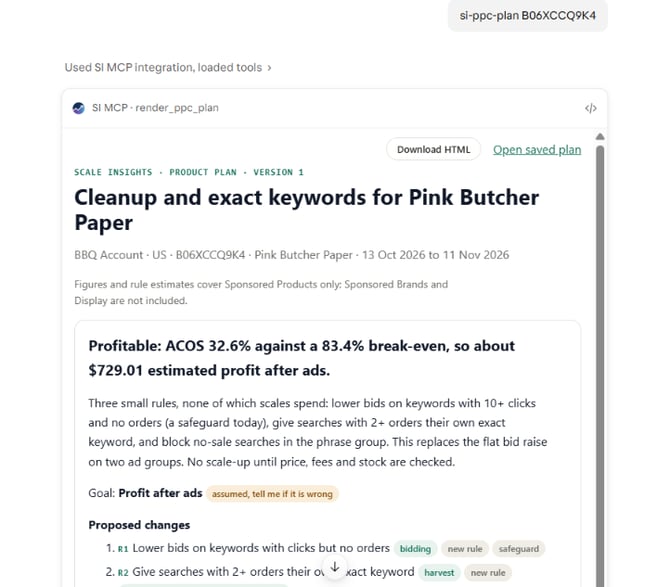
Start by entering the si-ppc-plan shortcut followed by the ASIN you want to analyze.
Command:
si-ppc-plan [ASIN]
You can also run si-ppc-plan without specifying an ASIN.
The AI analyzes the product's available economics, profit margins, and historical advertising performance. It then evaluates your product's advertising needs and proposes a suitable PPC strategy.
Depending on the product and its performance, recommendations may include:
- Bidding Rules to adjust keyword and product-target bids.
- Import Rules to harvest and add performing search terms as keywords.
- Negative targeting rules to help reduce wasted advertising spend.
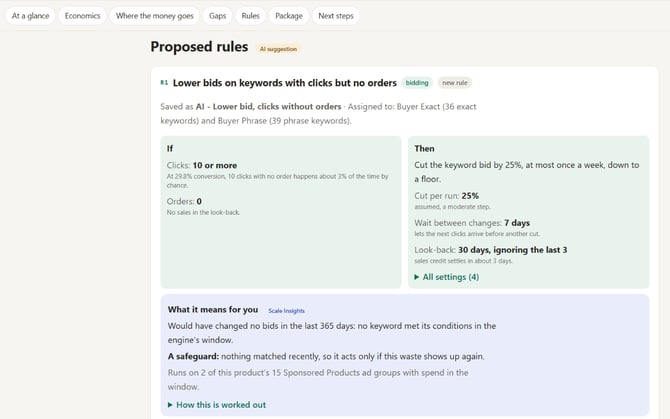
The proposed plan is tailored to the product's circumstances rather than applying the same criteria to every product.
Step 2: Review and Refine Your Strategy
You don't have to accept the initial recommendations as they are. You can discuss your advertising goals and preferences directly with the AI to adjust the proposed strategy.
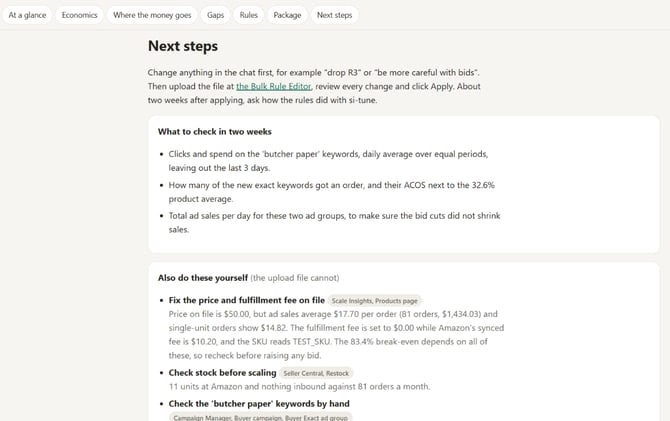
For example, if the initial plan recommends break-even bidding, but your goal is to maintain a specific advertising efficiency target, you can ask:
I want to target a 30% ACOS instead of using break-even bidding.
The AI uses its understanding of Scale Insights' algorithms, rules, and Strategic Objectives to revise the proposed configurations accordingly.
Each revised plan includes a chain of evidence explaining the recommendations and the reasoning behind them. This allows you to understand why certain rules or parameters are suggested.
Once you're satisfied with the recommendations, you can view the PPC plan directly in your app or download it as an HTML file for reference.
Step 3: Generate Your Automation Rules
After finalizing your PPC strategy, ask the AI to generate the automation import file.
Example prompt:
Build the upload file.
Scale Insights will generate a BulkRuleEditor ZIP file containing the automation rules and configurations based on your approved PPC plan.
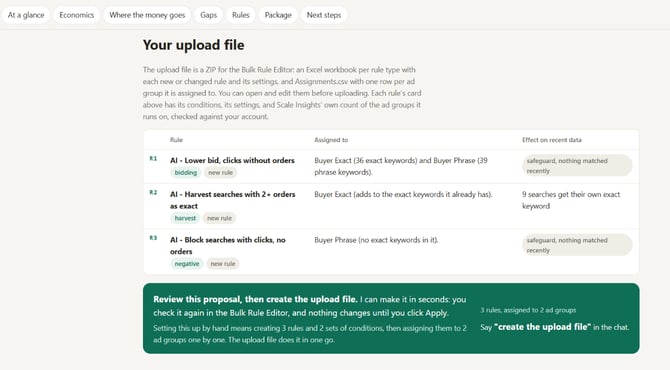
Download the ZIP file and review its contents before importing.
You can still customize your configurations, including:
- Editing existing rule parameters.
- Creating additional rules.
- Deleting rules that are no longer needed.
- Assigning Strategic Objectives to your rules.
Once you've finalized your configurations, navigate to the Bulk Rule Editor page in Scale Insights and upload the file to apply the automation setup to your account.
Important: Generating the upload file does not automatically activate the proposed automation. Review and upload the configurations through the portal before using them.
[drawer]Other Useful SI MCP Commands
While building your PPC strategy, you can also use other SI MCP commands to explore your account, analyze advertising performance, and manage your automation setup through AI.
These commands can complement the PPC planning workflow by providing additional context and helping you make more informed advertising decisions.
get_automation_playbooksimulate_proposed_bid_ruleget_automation_setupbuild_rule_packagerender_ppc_planget_ppc_plan_priorities
[drawer]Example Use Case: Building a PPC Strategy Around a Target ACOS
Let's say you're advertising a product with healthy profit margins and want to maintain a 30% ACOS while continuing to grow sales.
Instead of manually reviewing your campaigns and configuring individual rules, you can use the PPC Plan shortcut.
1. Analyze your product
Run si-ppc-plan [ASIN] to let AI evaluate your product economics and advertising performance.
2. Review the initial recommendations
The AI may recommend bidding adjustments, keyword harvesting, and negative targeting rules based on its analysis.
3. Refine your advertising objective
You can tell the AI:
I want to maintain a 30% ACOS target while continuing to scale sales. Adjust the proposed bidding strategy accordingly.
The AI revises the strategy to reflect your preferred target and explains the reasoning behind the updated recommendations.
4. Generate the automation package
Once you're satisfied, ask the AI to build the upload file.
5. Review and import
Download the BulkRuleEditor ZIP file, review and customize the rules if necessary, and upload the finalized configurations through your Scale Insights portal.
You now have a product-specific automation setup that reflects your advertising goals without having to build every rule from scratch.
[drawer]Things to Consider
Before using the SI PPC Plan shortcut, keep the following in mind:
- Review recommendations before implementation: AI-generated strategies are recommendations. Evaluate whether the proposed configurations align with your business objectives before importing them.
- Validate your product information: The quality and relevance of the recommendations depend on the product economics and advertising performance available for analysis.
- Customize when necessary: You can edit, add, or remove rules and adjust their parameters before uploading the generated package.
- Automation requires an import step: Generating a PPC plan or BulkRuleEditor ZIP file does not automatically create or activate the rules in your account. You must upload the finalized configurations through the Scale Insights portal.
- You remain in control: The AI helps develop and prepare your strategy, but you decide which recommendations to implement.
[drawer]Frequently Asked Questions
Does the AI automatically apply the recommended automation rules to my account?
No. The AI generates a PPC plan and a BulkRuleEditor ZIP file. You must review the configurations and upload them through the Scale Insights portal.
Can I change the recommendations generated by the AI?
Yes. You can discuss your advertising preferences and objectives with the AI. It can revise the proposed strategy based on your instructions.
Can I review the reasoning behind the recommendations?
Yes. The generated PPC plan includes a chain of evidence explaining the recommendations and the reasoning behind them.
Can I edit the automation rules before importing them?
Yes. The generated BulkRuleEditor package allows you to fine-tune parameters, create or delete rules, and assign Strategic Objectives before uploading the configurations.
Can I download the PPC plan?
Yes. You can view the plan directly in your app or download it as an HTML file.
Related Article
Scale Insights MCP – Learn how to connect and use Scale Insights MCP to interact with your Scale Insights account through AI.